Why Invest in SMS Marketing for Squarespace Site Growth
Implementing SMS marketing for a Squarespace site connects your store to an external messaging platform using platform extensions or webhook automations. By adding compliant opt-in fields across your site and checkout pages, merchants can automatically trigger instant order confirmations, recover abandoned shopping carts, and drive repeat purchases with targeted SMS promotions.
Mobile traffic accounts for roughly 47% of total ecommerce visits. When shoppers visit your online storefront on mobile devices, reaching them through text bridges the gap between passive browsing and active purchasing. Text messaging commands immediate attention: 87% of consumers check a text within 15 minutes of delivery, and business SMS maintains an average 98% open rate alongside a 19% click-through rate—a 533% increase compared to the typical 3.2% email average.
Furthermore, approximately 2 in 5 U.S. adults have purchased an item after receiving an SMS from a brand, with millennials leading this shift at 51%. Integrating dedicated SMS marketing directly into your store infrastructure turns occasional visitors into long-term subscribers who welcome timely notifications.
Building an effective, direct SMS marketing strategy allows you to bypass complex social algorithms and communicate directly with warm leads who explicitly asked to hear from you.
Email and Text Synergy for Higher Conversions
Adopting SMS does not mean abandoning email. In fact, running both channels in tandem creates a balanced direct-to-consumer ecosystem.
Email provides the visual real estate needed for detailed product guides, rich brand storytelling, curated editorial newsletters, and lengthy transaction receipts. In contrast, SMS delivers instant velocity. It is built for concise, urgent alerts: flash sales, back-in-stock pings, delivery notifications, and limited-time discount codes.
By harmonizing both channels, you can establish automated logic that protects subscriber trust. For example, if a customer opens and redeems a discount sent via email, your automation can suppress the corresponding SMS alert, avoiding redundant pings. If an email goes unread during an urgent 24-hour promotion, a brief text sent six hours before the deadline ensures the shopper does not miss out.
SMS vs MMS: Selecting the Right Message Format
Choosing between standard SMS and Multimedia Messaging Service (MMS) depends on your specific campaign goals, budget, and creative assets.
| Feature | Standard SMS | Multimedia Messaging (MMS) |
|---|---|---|
| Character Limit | 160 characters per segment | Up to 1,600 characters + media |
| Media Support | Plain text and short URLs only | Static images, GIFs, short video, vCards |
| Average Cost | Lower base carrier fee per send | Typically 2x–3x the cost of SMS |
| Throughput & Delivery | Instantaneous, highly uniform | Slight carrier rendering variations |
| Best Use Case | Order tracking, simple alerts, short codes | Product catalog launches, visual promotions |
Standard SMS works best for time-sensitive notifications, order confirmations, and simple discount codes where clarity is paramount. MMS shines during visual product drops, seasonal catalog showcases, or when sending animated countdown timers for exclusive promotions.
Step-by-Step Technical Setup and Platform Integration
Connecting an external SMS platform to your store architecture creates an automated pipeline from initial site visit to post-purchase retention.
Whether you work with tools like SimpleTexting or use dedicated solutions like the EZ Texting extension for Squarespace, setting up the technical bridge requires a clean, structured workflow. If you need assistance configuring multi-channel systems, exploring our specialized marketing services can streamline your deployment.
Building Compliant Opt-In Forms for SMS Marketing for Squarespace Site Visitors
Growing a subscriber list requires distinct, legally valid opt-in touchpoints across your site. Because mobile numbers are personal, site visitors must know exactly what they are signing up for.
- Promotional Pop-Ups: Deploy a targeted pop-up triggered after a visitor views two or more pages. Keep copy concise: “Join our VIP text club for 15% off your first order and early access to sales.”
- Embedded Footer Forms: Place a clean subscription block in your footer offering exclusive drop updates.
- Checkout Consent Checkboxes: Add a designated phone number collection field with a standalone checkbox on your checkout page.
- Keywords and Shortcodes: Display a textable keyword on physical packaging, event banners, or product inserts (e.g., “Text JOIN to 555-123-4567”).
- QR-to-Text Growth Loops: Place scannable QR codes in your retail space or unboxing inserts that automatically pre-fill a subscription text on the user’s mobile device.
To remain fully aligned with TCPA compliant opt-in protocols, the consent checkbox at checkout must never be pre-checked. Opting into text alerts must be an active, voluntary decision made by the shopper.
Connecting Automation Platforms and Custom Checkout Fields
To connect checkout activity to automated SMS messages, set up a smooth data pipeline:
- Register Your Messaging Brand (10DLC / Toll-Free): Complete A2P 10DLC (10-Digit Long Code) brand and campaign registration within your texting provider. This carrier-mandated process verifies your business identity and protects your messages from carrier spam filters.
- Add Custom Checkout Fields: In Squarespace, navigate to Commerce settings and configure custom checkout fields to collect mobile numbers and explicit opt-in consent.
- Establish Webhook Connections: Use Zapier, Make, or direct platform extensions to capture new order events, customer profile creations, and form submissions.
- Map Data Fields Accurately: Match Squarespace form variables—such as First Name, Phone Number, Order ID, and Consent Timestamp—to the corresponding subscriber attributes in your SMS software.
- Test the End-to-End Flow: Complete a live test transaction to verify that phone numbers format properly with international country codes (e.g.,
+1for the United States) and that automated welcome texts trigger without delay.
High-Impact Automated Campaigns for Squarespace Ecommerce
Automated message flows deliver real-time engagement without requiring manual campaign sends for every order. Implementing a profitable SMS program architecture ensures that every automated trigger aligns with customer behavior.

Automating Workflows and SMS Marketing for Squarespace Site Orders
Transactional messages generate some of the highest engagement rates across all digital marketing channels. Customers actively look for shipping confirmations and delivery notices right after placing an order.
- Order Confirmation: Immediately sends a receipt summary and order number upon checkout completion.
- Fulfillment & Shipping Updates: Triggers real-time delivery tracking links when an item is marked fulfilled in your dashboard.
- Customer Support Routing: Enables two-way conversational text so customers can reply directly to order updates if they need address corrections or sizing help.
Keeping buyers informed at every step reduces “Where is my order?” inquiries and builds long-term customer trust.
Abandoned Cart Recovery and Time-Sensitive Flash Sales
Cart abandonment remains one of the largest revenue leaks for ecommerce stores. Sending a strategic text message recovers sales that email reminders alone might miss.
- Timing: Trigger the first recovery text between 45 and 60 minutes after cart abandonment.
- Dynamic Links: Include direct checkout links that take shoppers straight back to their saved items with the discount pre-applied.
- Flash Sale Urgency: Use brief countdown alerts for 24-hour promotions to prompt immediate decisions from high-intent subscribers.
Appointment Confirmations and Post-Purchase Care
If you use Squarespace Scheduling for service bookings, automated texts help eliminate missed sessions and increase repeat bookings.
- Appointment Confirmations & Reminders: Send an automated booking confirmation immediately, followed by a reminder text 24 hours prior to the scheduled service.
- Product Care Instructions: Send a post-purchase text 3 days after product delivery with a link to a care guide or tutorial video.
- Review & UGC Requests: Schedule a message 7 to 14 days post-delivery asking satisfied buyers for a quick review or photo submission in exchange for store points.
Compliance, Timing, and Optimization Best Practices
SMS is an intimate communication channel. Reaching directly into a customer’s personal inbox requires strict compliance with federal regulations and careful attention to message cadence. You can read more about data-driven audience strategies on our marketing blog.
Navigating TCPA, 10DLC, GDPR, and CASL Regulations
Non-compliance carries severe legal and financial risks, with statutory fines under the Telephone Consumer Protection Act (TCPA) ranging from $500 to $1,500 per unauthorized message.
- Prior Express Written Consent: You must have clear, verifiable consent before sending any promotional message.
- Transparent Disclosures: State your business name, message frequency, and that message and data rates may apply.
- Automated Opt-Out Mechanisms: Support universal opt-out keywords like
STOP,END,CANCEL,UNSUBSCRIBE, andQUIT. When a subscriber sendsSTOP, remove them from all marketing lists immediately. - Help Commands: Ensure your system auto-responds with customer support contact information whenever a user texts
HELP. - Content Restrictions (SHAFT-C): Strictly avoid messaging involving Sex, Hate, Alcohol, Firearms, Tobacco, or Cannabis unless operating under verified, age-gated carrier exceptions.
- International Laws: If marketing to international buyers, comply with Canada’s Anti-Spam Legislation (CASL) and the European Union’s General Data Protection Regulation (GDPR).
Message Cadence, Audience Segmentation, and Quiet Hours
Bombarding your list with daily promotional blasts leads to subscriber fatigue and high opt-out rates. Maintain high engagement with these operational best practices:
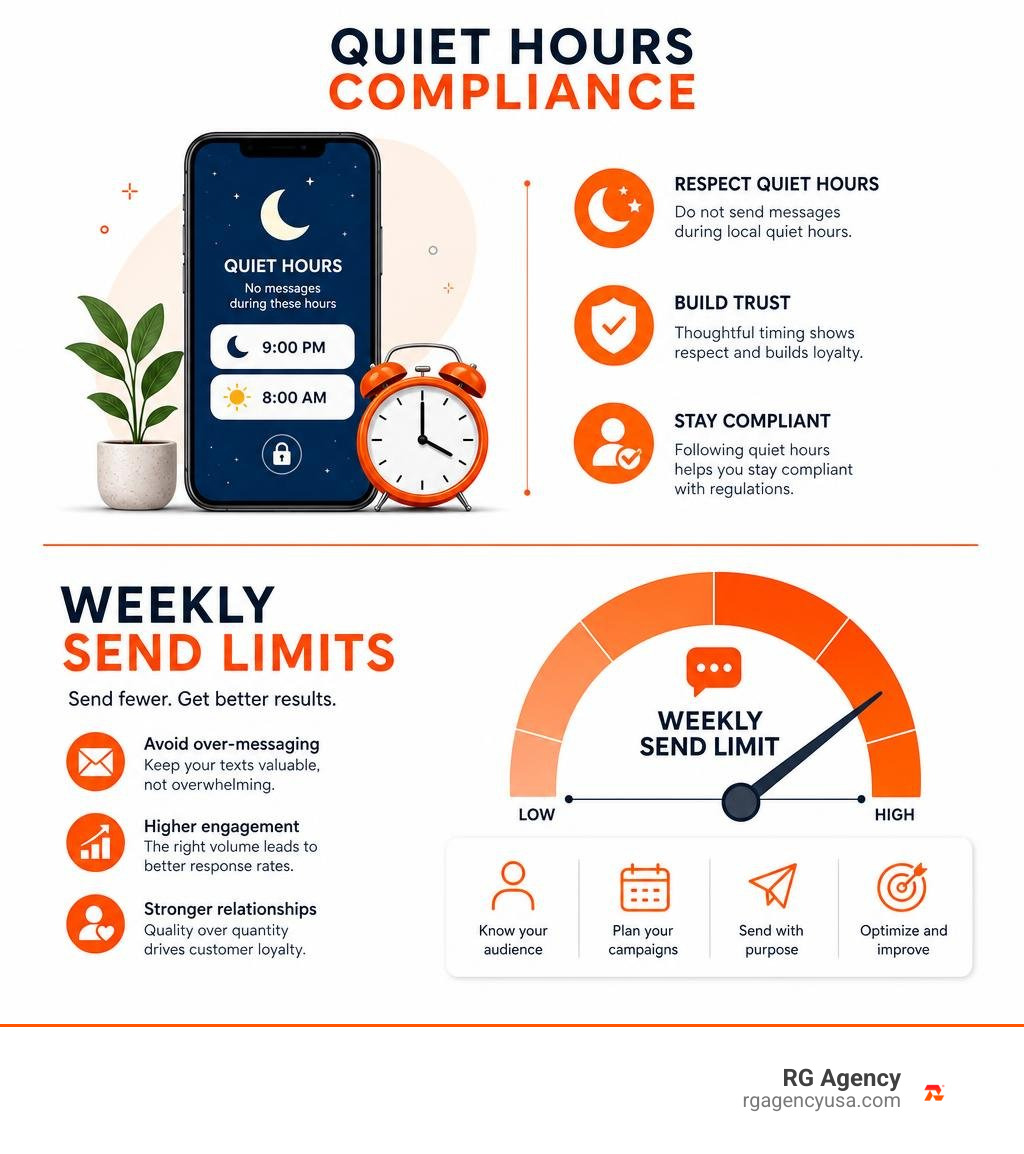
- Observe Quiet Hours: Under federal guidelines, never send marketing messages outside of 8:00 AM to 9:00 PM in the recipient’s local time zone. Best practice is to narrow sending windows to 9:00 AM through 8:00 PM.
- Limit Message Frequency: Send between 2 to 4 promotional campaigns per month. Reserve higher message counts strictly for time-sensitive transactional updates.
- Segment Your Audience: Group subscribers by behavior, such as VIPs (high lifetime value), recent purchasers, category-specific browsers, and inactive contacts.
- Suppress Recent Buyers: Automatically exclude customers who purchased within the last 7 days from broad promotional sales to avoid frustrating recent full-price shoppers.
- Track Performance with UTMs: Use shortened, branded links containing UTM parameters to track exact conversion rates and revenue within your analytics platform.
Frequently Asked Questions About Squarespace SMS Marketing
How often should an online store send promotional text messages?
Most ecommerce brands find success sending 2 to 4 promotional text broadcasts per month. Over-messaging leads to subscriber fatigue and spikes in opt-out rates. Transactional messages—such as order receipts, shipping confirmations, and appointment reminders—do not count toward this marketing limit and should be delivered in real time as events occur.
Do you need explicit consent before texting customers?
Yes. Under TCPA regulations in the United States and global data privacy frameworks (such as GDPR and CASL), businesses must secure prior express written consent before sending promotional texts. Simply having a customer’s phone number from a past order or contact form does not grant permission for marketing texts. Your signup forms must feature explicit disclosure language, non-checked opt-in boxes, and links to your privacy policy and terms of service.
Can you automate abandoned cart SMS reminders from Squarespace?
Yes. By using Squarespace commerce extensions or connecting your store events via webhooks and tools like Zapier, you can trigger automated cart recovery messages. The system detects when a checkout is started but not completed, waits a designated period (typically 45 to 60 minutes), and sends a single recovery text containing a direct link back to the shopper’s cart.
Conclusion
Text messaging gives Squarespace store owners a direct, high-converting channel to engage shoppers, recover lost carts, and drive repeat sales. With 98% open rates and rapid response times, adding SMS alongside email creates a balanced marketing engine that reaches customers where they spend their time.
The key to long-term success lies in clear opt-in consent, personalized message flows, and reliable automation. If you are ready to scale your online store with a cohesive multi-channel strategy, explore our complete SMS marketing services or get in touch through our contact page to build a high-performing messaging program tailored to your brand.