
Why Google Paid Search Drives Fast, Measurable Growth
To run effective paid search Google campaigns, start with high-intent keywords, send each ad to a closely matched landing page, track leads or sales, and use that data to improve bids over time. Google Search ads put your business in front of people already looking for what you sell, so you can gain visibility quickly while paying primarily when someone clicks.
For a small business with uneven traffic and unclear marketing results, that control matters. You can set a daily budget, target the cities you serve, block irrelevant searches with negative keywords, and measure what happens after every click.
Paid search does not replace SEO. SEO builds durable organic visibility over time; paid search delivers immediate placement in sponsored results. Together, they help cover both short-term lead generation and long-term search growth.
I am Roger Aguiar, Owner and CEO of RG Agency, where I have helped businesses use data-driven SEO, PPC, paid social, and automation to connect marketing spend to leads and sales. In this guide, I will break down how paid search Google works and how to turn it into a clearer, more reliable growth channel.
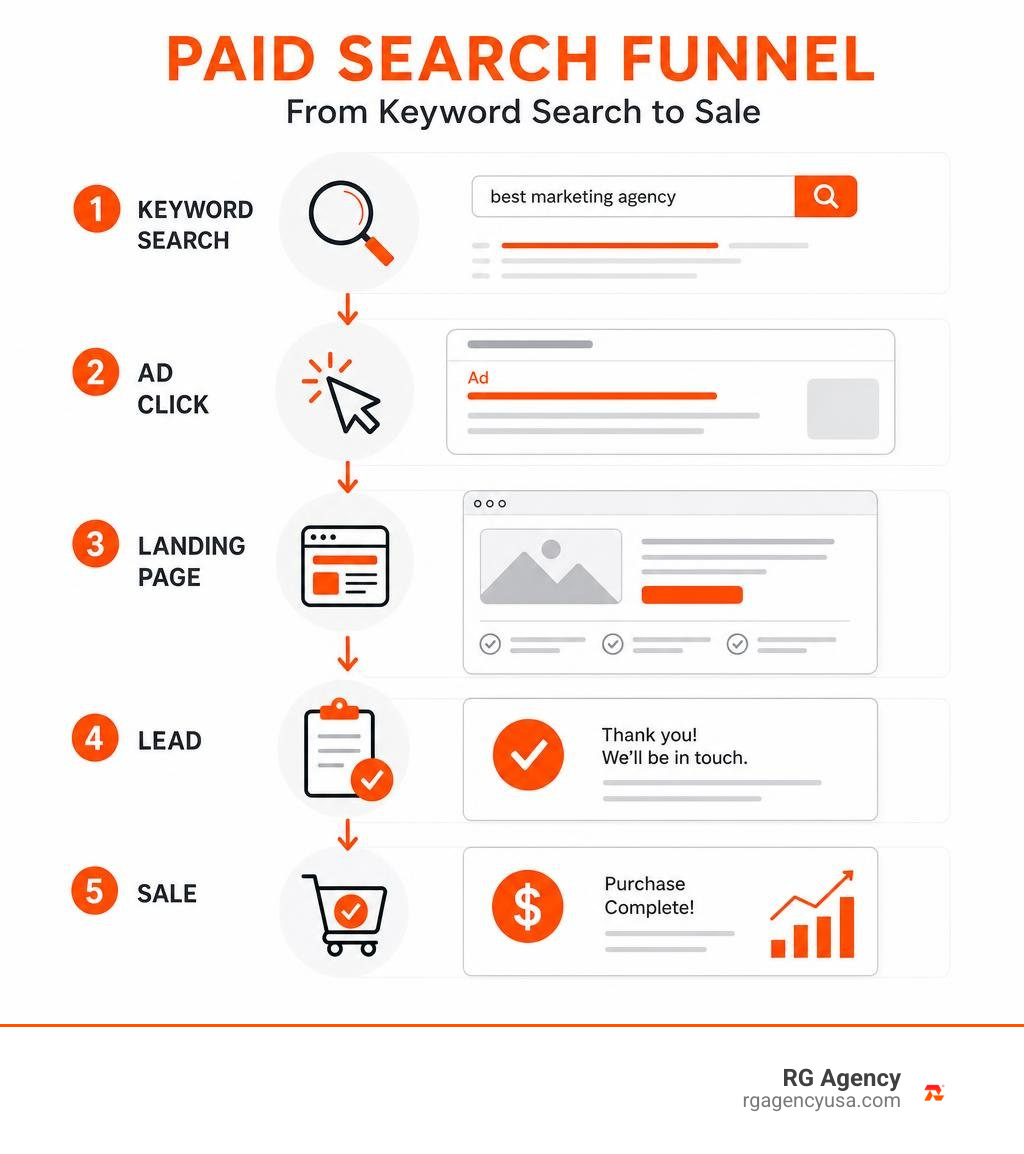
Every day, Google handles over 3.5 billion searches. While people browse social media to be entertained, they turn to search engines with clear intent. When users search for solutions, 65% of high-intent searches result in an ad click. Research also shows that paid search visitors are twice as likely to make a purchase compared to organic visitors. Search advertising captures demand at the exact moment a buyer is looking for an answer.
Core Mechanics of Paid Search Google: Auctions, Quality Score, and Ad Rank
Google Ads operates on an auction system, but winning does not simply mean outspending everyone else. Instead, Google balances advertiser bids with user experience to decide which ads appear and in what position.
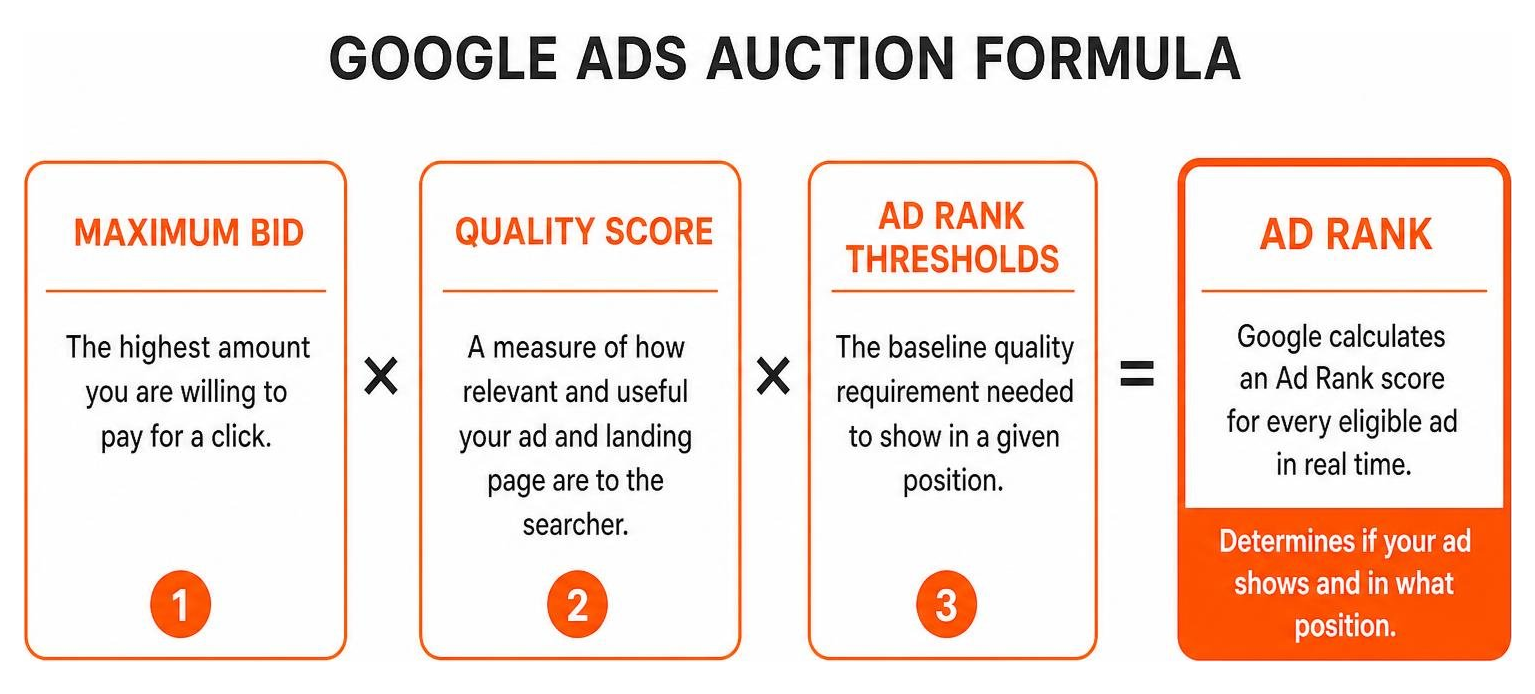
Google calculates an Ad Rank score for every eligible ad in real time. Ad Rank is determined by:
- Your Maximum Bid: The highest amount you are willing to pay for a click.
- Quality Score: A measure of how relevant and useful your ad and landing page are to the searcher.
- Ad Rank Thresholds: The baseline quality requirement needed to show in a given position.
- Auction Competitiveness: The context and bids of competing advertisers.
- Expected Impact of Assets: How your sitelinks, callouts, and structured snippets improve click likelihood.
Under this system, an advertiser with a high Quality Score can outrank a competitor who bids more but delivers a poor user experience. To explore fundamental cost controls, you can learn more About Manual CPC bidding and how maximum limits function.
The Google Ads Auction Algorithm and Real-Time Bidding
Every time a user submits a search query, Google runs an instantaneous auction. The auction algorithm evaluates auction-time signals such as the user’s location, device, time of day, query context, and search intent.
Google uses a modified second-price auction model. You do not necessarily pay your full maximum bid. Instead, your actual CPC is calculated based on the minimum amount required to beat the Ad Rank of the competitor directly below you:
$$\text{Actual CPC} = \frac{\text{Ad Rank to Beat}}{\text{Your Quality Score}} + \$0.01$$
This formula rewards relevant ads. Improving your quality metrics reduces the cost required to maintain top ad positions.
Decoding Quality Score: CTR, Relevance, and Landing Page Experience
Quality Score is reported on a scale from 1 to 10 for each keyword in your account. It acts as a diagnostic tool based on three core components:
- Expected Click-Through Rate (eCTR): Google’s prediction of how likely users are to click your ad when shown for that keyword.
- Ad Relevance: How closely your ad copy matches the specific intent behind the search term.
- Landing Page Experience: How relevant, transparent, easy to navigate, and fast your destination page is.
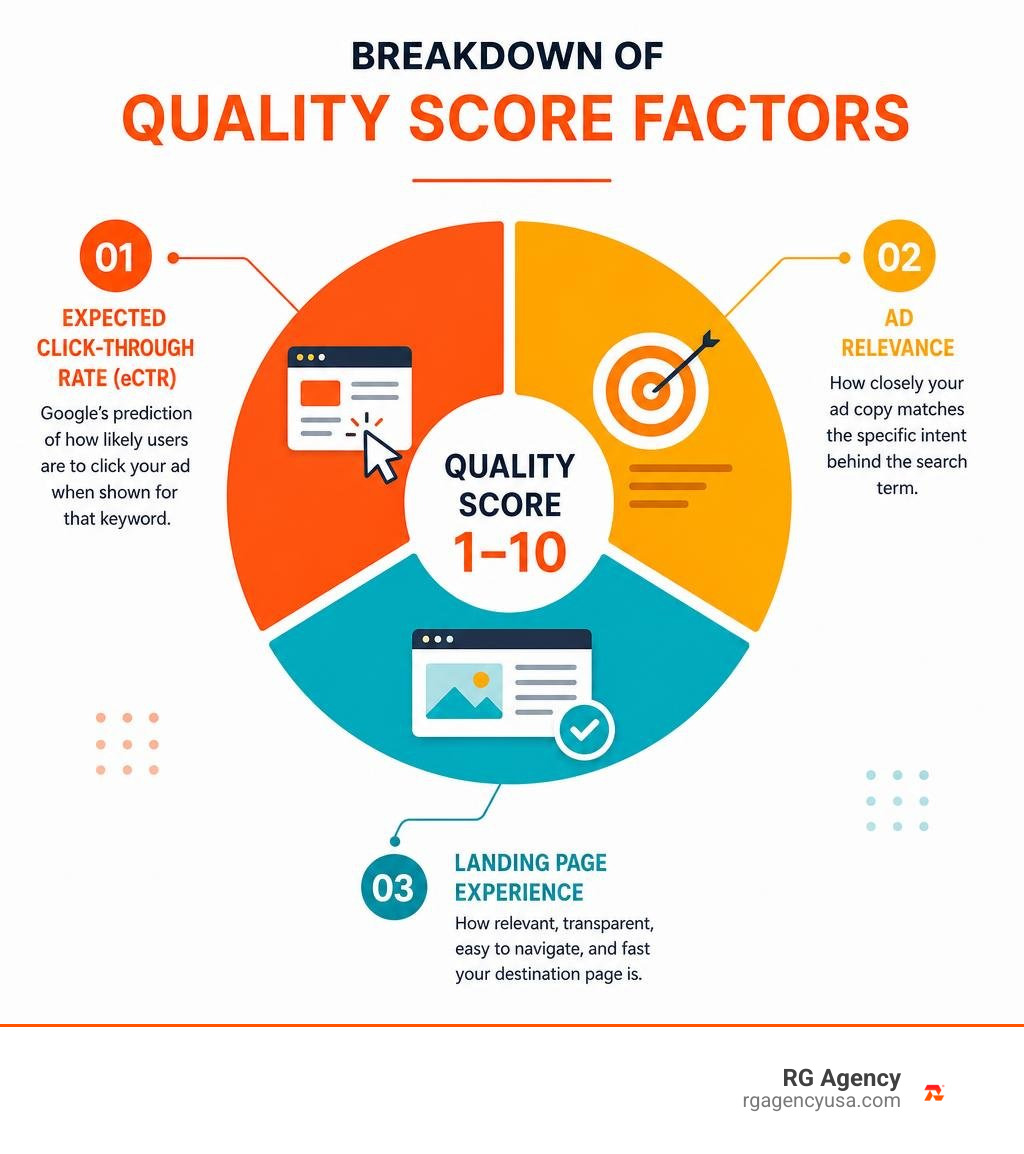
A high Quality Score lowers your cost per click and helps your budget go further across every campaign.
Key Campaign Formats and Structuring for High Performance
Google Ads provides several campaign types tailored to different business models and customer journeys. Choosing the right format ensures your budget aligns with user intent.
| Ad Format | Best Use Case | Typical Intent Level | Primary Strengths |
|---|---|---|---|
| Search (Text) Ads | Lead generation, professional services, high-intent B2B | High / Transactional | Precise keyword targeting, full ad copy control |
| Shopping Campaigns | E-commerce retail, physical product sales | Very High / Purchase | Visual product image, pricing display, SKU sync |
| Local Services Ads | Home service providers, local urgent needs | Immediate Action | Pay-per-lead, verified badges, direct calling |
| Dynamic Search Ads | Large catalog sites, broad inventory coverage | Moderate to High | Auto-generated headlines based on site content |
To understand how these ad types fit into a broader media strategy, explore our overview of the Types of PPC Ad Campaigns.
Mastering Paid Search Google Match Types and Negative Keywords
Keyword match types allow you to control how closely a search query must match your keyword before triggering an ad.
- Exact Match
[keyword]: Triggers ads only for searches with the same meaning or intent as your keyword, including close variants. - Phrase Match
"keyword": Triggers ads for searches that include the meaning of your keyword, preserving core context even if other words are added before or after. - Broad Match
keyword: Triggers ads on related searches, synonyms, and variations. When paired with Smart Bidding, broad match helps discover relevant queries you might not have considered.
To protect your budget from unqualified clicks, maintain an active negative keyword list. Review your Search Terms Report weekly to find irrelevant queries and block them. For example, if you offer premium consulting, adding negative terms like “free,” “jobs,” or “cheap” prevents wasted ad spend.
Creating High-Converting Responsive Search Ads
Responsive Search Ads (RSAs) are the default text ad format on the Search Network. You can provide up to 15 headlines (30 characters each) and up to 4 descriptions (90 characters each). Google’s machine learning tests different combinations to find the highest-performing variations for each user query.
Case studies show that advertisers who improve their Ad Strength from “Poor” to “Excellent” see an average of 15% more clicks and conversions. Adding a second RSA to an ad group can generate a 6.6% increase in conversions at a similar cost per conversion.
Review Google’s documentation About responsive search ads – Google Ads Help to optimize your asset setup.

Best practices for writing responsive search ads:
- Include primary keywords naturally across at least 3–5 headlines.
- Highlight distinct selling propositions, promotions, and guarantees.
- Include clear calls to action (e.g., “Schedule a Consultation,” “Get a Free Quote”).
- Use ad pinning sparingly. Pinning a headline to Position 1 limits Google’s ability to test combinations. Only pin when legally or contractually required.
- Add assets like sitelinks, callouts, structured snippets, and image assets to maximize ad real estate.
Step-by-Step Guide to Launching and Bidding on Your Campaign
Setting up a structured search campaign ensures your budget is spent efficiently from day one.
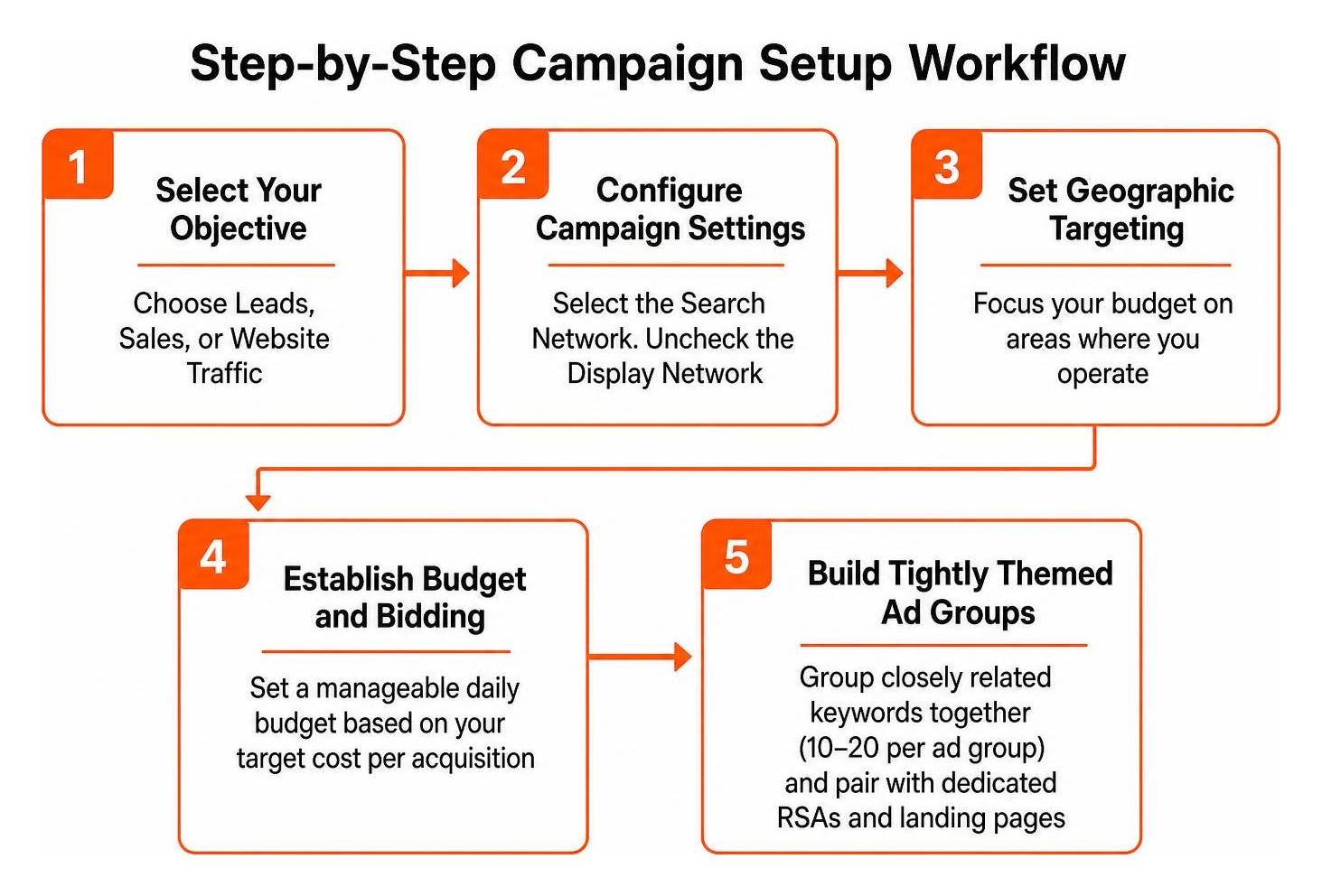
- Select Your Objective: Choose Leads, Sales, or Website Traffic based on your primary business goal.
- Configure Campaign Settings: Select the Search Network. Uncheck the Display Network to keep text search separate from visual display traffic.
- Set Geographic Targeting: Focus your budget on areas where you operate. For businesses serving specific Texas markets—such as Austin, Houston, San Antonio, Georgetown, or Dallas—set precise location parameters. Review our guide on Google Ads for Local Business for location-specific targeting advice.
- Establish Budget and Bidding: Set a manageable daily budget based on your target cost per acquisition. For a broader overview of campaign architecture, read our Complete Google Ads Guide.
- Build Tightly Themed Ad Groups: Group closely related keywords together (10–20 keywords per ad group) and pair them with dedicated RSAs and landing pages.
- Deploy Assets and Verify Conversion Tracking: Add sitelinks, callout assets, and phone numbers. Ensure conversion tracking is active before turning campaigns on.
Choosing the Right Smart Bidding Strategy
Google Ads offers several automated bidding strategies designed for specific business outcomes. You can learn how to Determine a bid strategy based on your goals – Google Ads Help.
- Maximize Conversions: Automatically sets bids to get the highest conversion volume within your daily budget.
- Target CPA (Cost Per Acquisition): Sets bids to generate as many conversions as possible at or below your target cost.
- Maximize Conversion Value: Focuses on generating the highest total revenue rather than conversion volume.
- Target ROAS (Return on Ad Spend): Adjusts bids dynamically to achieve a specific revenue-to-spend ratio.
- Target Impression Share: Sets bids to place your ad at the absolute top of the page, top of the page, or anywhere on the SERP for brand protection.
Note: Enhanced CPC (eCPC) was deprecated in March 2025. Modern campaigns rely on Smart Bidding or controlled Manual CPC.
Steering AI-Powered Bidding and Automation
Smart Bidding uses machine learning to evaluate hundreds of auction-time signals—such as device operating system, browser, language settings, and geographic intent—adjusting bids for every individual search.
Advertisers maintain control by steering AI tools rather than letting them run unmonitored. Google outlines best practices in How to steer AI-powered search ads – Google Ads Help.
- Seasonality Adjustments: Inform Smart Bidding about expected conversion rate spikes during short promotions (1–7 days) so algorithms adjust bids preemptively.
- Data Exclusions: Tell the bidding system to ignore specific date ranges if site tracking experienced technical issues, preventing skewed bidding data.
- Bid Simulators: Use Google’s simulation tools to forecast how changes in target CPA or ROAS will affect traffic, cost, and conversion volume.
Ongoing Campaign Optimization and Measurement Frameworks
A paid search campaign requires ongoing refinement. Tracking performance data allows you to optimize ad spend systematically.
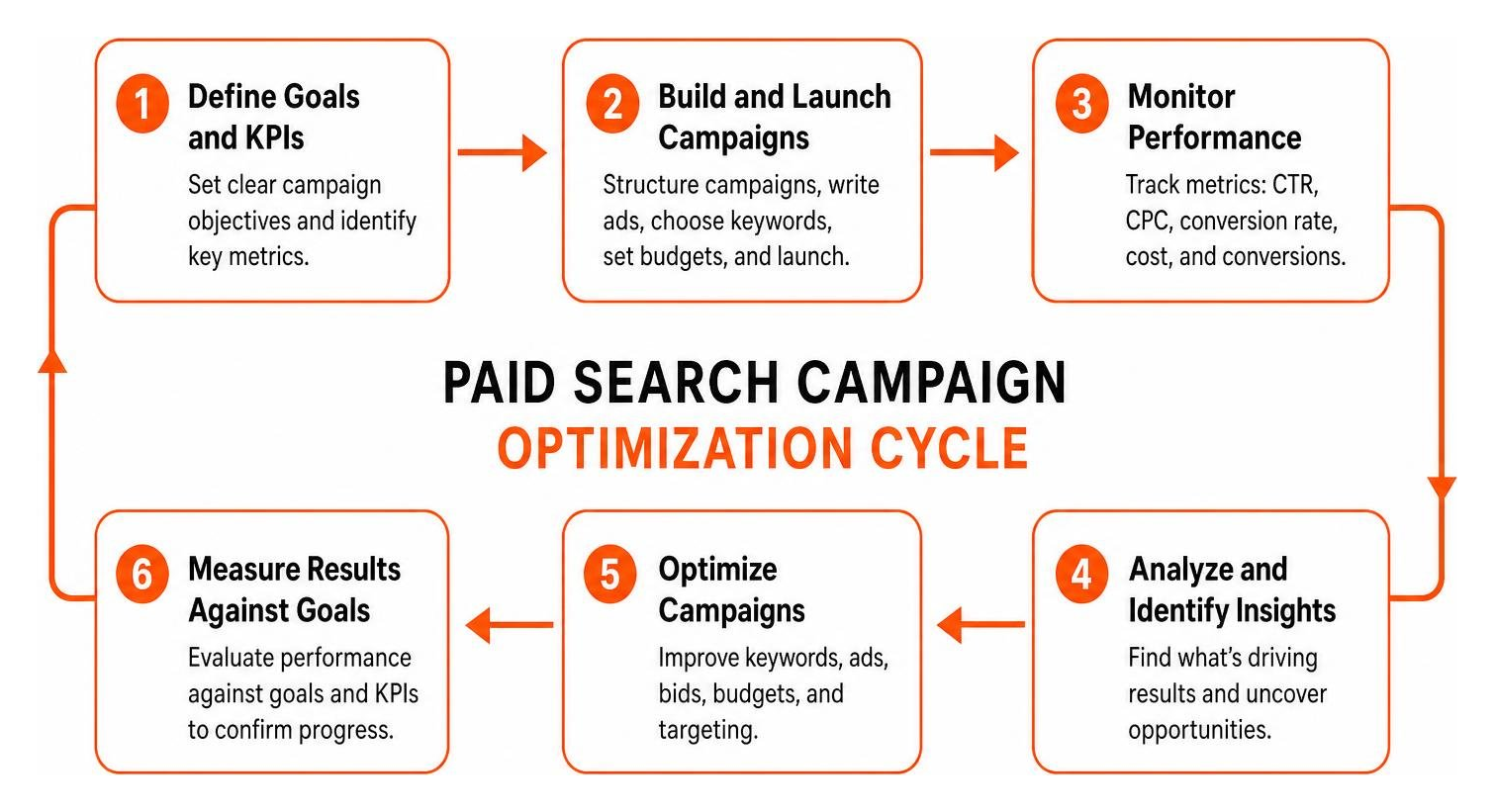
Key Metrics to Monitor
- Click-Through Rate (CTR): Measures how compelling your ad is to searchers. A low CTR often indicates weak copy or poor keyword relevance.
- Cost Per Click (CPC): The actual price paid for each visit, shaped by competition and Quality Score.
- Conversion Rate (CVR): The percentage of ad clicks that result in a phone call, form submission, or purchase.
- Cost Per Acquisition (CPA): Total ad spend divided by total conversions.
- Return on Ad Spend (ROAS): Total revenue generated divided by total ad spend ($\text{ROAS} = \frac{\text{Revenue}}{\text{Spend}}$). Across industries, businesses earn an average benchmark of $2 in revenue for every $1 spent on Google Ads.
To scale paid search effectively while keeping acquisition costs under control, explore our dedicated Services Pay Per Click support.
Integrating Paid Search Google into an Omnichannel Growth Engine
Search advertising works best as part of an integrated marketing system. Combining paid search with other channels produces stronger results across the entire funnel:
- Paid Search and SEO: Paid search provides immediate first-page visibility while long-term content strategies mature. Paid search query data also reveals high-converting keywords to target in organic search. For a detailed comparison, see our guide on SEO vs PPC Best Strategy 2025.
- Paid Search and Paid Social: Use social platforms to build brand awareness, then capture resulting search demand through Google Ads. You can also re-engage search ad visitors using targeted social retargeting.
- Remarketing Lists for Search Ads (RLSA): Customize search bids and ad copy for people who previously visited your website when they search for relevant terms again.
To see how these channels connect into a unified marketing plan, review our framework for a Winning Marketing Strategy for 2025.
Frequently Asked Questions About Google Search Ads
What is the difference between paid search and organic SEO?
Paid search is a pay-per-click model that provides immediate visibility at the top of search engine results pages. Organic SEO focuses on earning non-paid rankings over time through content optimization, technical performance, and link authority. Paid search delivers fast, controllable traffic, while SEO builds compounding long-term equity.
How much budget is needed to start running Google Search ads?
There is no fixed minimum spend requirement for Google Ads. You can start with a modest daily budget, such as $30 to $50 per day, to test initial keywords and gather performance data. As you identify winning keywords and establish a profitable cost per acquisition, you can scale your budget predictably.
How do AI and Smart Bidding improve Google paid search performance?
Smart Bidding uses machine learning to analyze contextual signals in real time during every ad auction. Instead of setting a single static bid for a keyword, AI adjusts bids up or down based on how likely each specific searcher is to convert. This automation improves conversion rates, lowers wasted ad spend, and helps maximize overall return on investment.
Conclusion
Google paid search remains a core pillar of digital marketing because it reaches potential customers at the exact moment they are looking for solutions. By understanding auction dynamics, maintaining a high Quality Score, structuring campaigns effectively, and steering AI bidding tools, businesses can turn search intent into measurable revenue.
At RG Agency, we help companies in Austin, Houston, San Antonio, Georgetown, Dallas, and beyond build scalable search campaigns connected to clear business outcomes. Explore our full range of solutions at RG Agency Digital Marketing Strategy to build an advertising engine that drives steady growth.