
Evaluating Models for Affordable Web Design Services
Finding the right affordable web design services comes down to four primary models: one-time flat-fee templates ($29–$129) offering full code ownership without recurring fees, AI-powered website builders ($1–$5/month) for rapid automated generation, mainstream SaaS platforms ($16–$40+/month) with managed ecosystems, and custom agencies designed for high-conversion ROI. Choosing the best option depends on your technical comfort, budget, and need for long-term scalability.
Today, launching a business website does not require choosing solely between an expensive agency engagement or weeks of complicated setup. Each modern development model approaches code ownership, hosting, and functionality differently:
- One-Time Flat-Fee Templates: Developers create semi-custom HTML/CSS templates based on your brief. You pay a single upfront cost (such as $29 for a starter 1–3 page layout or $79 for a standard 4–6 page site), receive your production files, and own the code outright. You must supply your own hosting and domain name, but you never pay a recurring platform fee.
- AI-Powered Website Generators: Platforms leverage artificial intelligence to generate layouts, copy, and styling in seconds for as little as $1/month ($12/year billed annually). These platforms bundle AI drafting, integrated hosting, and SSL certificates into an entry-level micro-subscription.
- Mainstream SaaS Website Builders: Popular subscription-based website builders charge recurring fees ranging from $16 to $40+ per month. While user-friendly, costs compound steadily year over year, and users remain locked into their proprietary hosting environments.
- Custom Development & Marketing Agencies: Full-service partners craft bespoke user experiences tailored to conversion funnels, brand identity, and scalable search visibility. While the upfront investment is higher, it delivers custom architecture designed around return on investment.
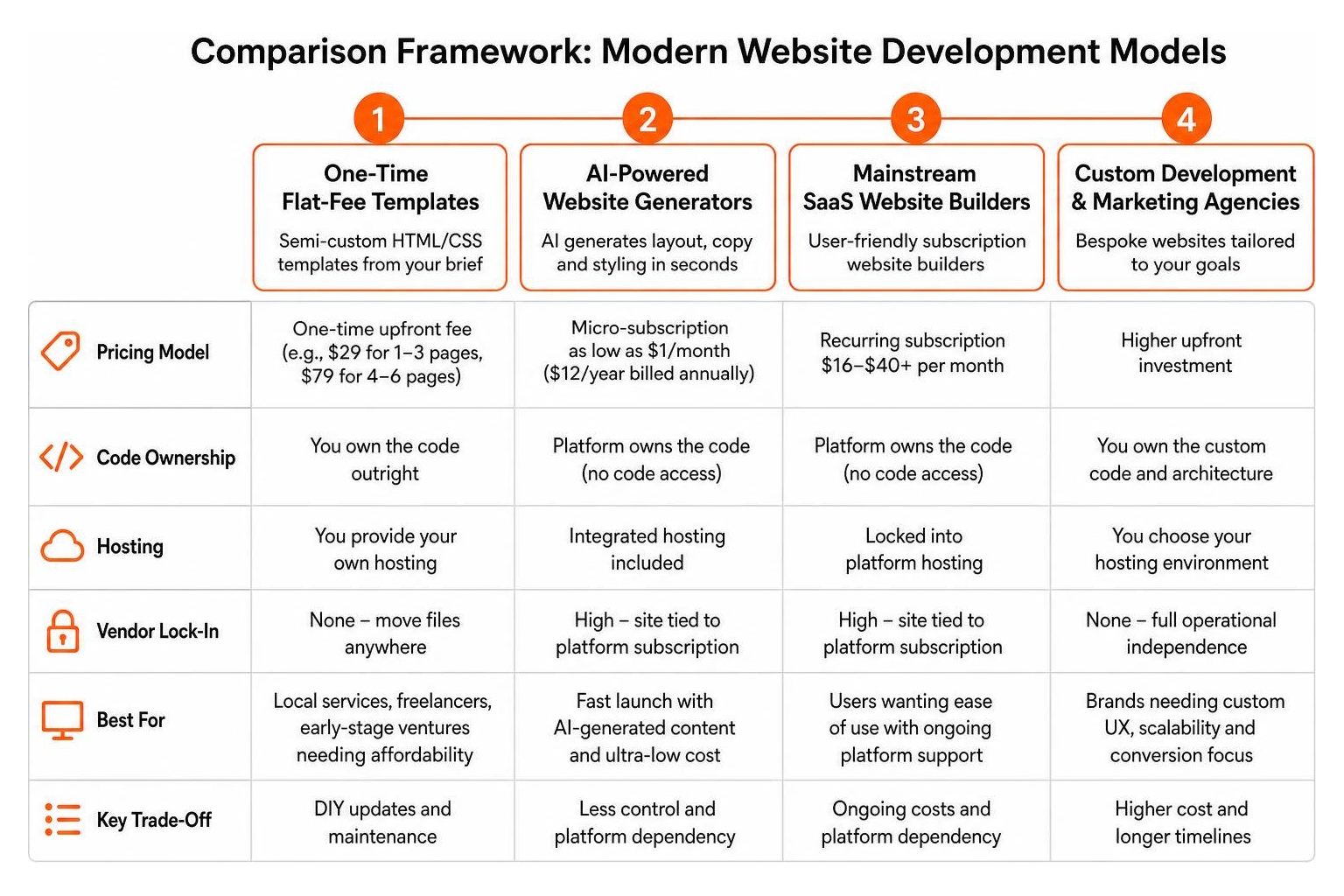
Understanding vendor lock-in is vital. When using closed SaaS builders, you do not own your underlying code; if you cancel your subscription, your website disappears. Conversely, static templates give you raw files that can be moved anywhere, while custom code frameworks give you absolute operational independence.
Selecting Affordable Web Design Services for Early-Stage Startups
For bootstrapped founders launching their first concept, every dollar counts. Flat-fee DIY templates have become an increasingly popular route for local services, freelancers, and early-stage ventures looking to get online without ongoing overhead.
With services delivering configured templates in under an hour, a business can deploy a polished digital storefront almost instantly. The primary appeal lies in total code ownership and predictable expenses. For example, opting for a flat $29 or $79 setup avoids monthly platform charges that drain early cash flow.
However, founders must weigh initial affordability against long-term operational needs. While a flat-fee template eliminates monthly builder fees, you assume full responsibility for uploading files to a static host, linking your domain registrar, and editing text inside markup files or a lightweight content management system. Understanding the custom designed website benefits early on helps you determine whether a starter template fits your current milestone or if your commercial goals require tailored functionality from day one.
How AI Builders Deliver Affordable Web Design Services
AI website builders represent a massive leap in accessibility. By prompting an engine with your industry, target audience, and style preferences, tools generate functional layouts, integrated contact forms, and starter sales copy in minutes.
These platforms dramatically lower the barrier to entry by combining several operational layers:
- Automated Asset Generation: The platform produces color palettes, font pairings, and responsive column layouts automatically.
- Bundled Hosting Infrastructure: The $1 to $5 monthly fee typically covers cloud storage, SSL certificates, and bandwidth, removing the friction of configuring external nameservers.
- Visual Drag-and-Drop Customization: Non-technical founders can tweak text, swap imagery, and reorder sections without opening a code editor.
For validation experiments, event pages, or micro-businesses, AI builders deliver unbeatable speed. However, simplicity comes with constraints. The generated layouts often follow rigid design modules, and deep customization of backend scripts or specialized tracking logic is rarely supported on entry-level plans.
Hidden Costs and True 3-Year Total Cost of Ownership
Evaluating web design purely by its initial invoice is one of the most common pitfalls founders encounter. A solution that advertises itself as “$1/month” or “$29 one-time” can accumulate unexpected secondary costs over time, whereas a professional build includes many of these necessities out of the box.
To accurately budget, compare the projected 3-year Total Cost of Ownership (TCO) across each approach:
| Cost Element | DIY Static Template | Entry AI Builder | Mainstream SaaS Builder | Professional Agency Build |
|---|---|---|---|---|
| Initial Build / Setup | $29 – $129 | $0 (Self-prompted) | $0 – $200 (Theme) | $2,500 – $7,500+ |
| Platform / Subscription | $0 | $36 – $180 ($1-$5/mo) | $576 – $1,440 ($16-$40/mo) | $0 (Open-source CMS) |
| Domain Name (3 Years) | $36 – $60 | $36 – $60 | $36 – $60 | Included / $36 – $60 |
| Hosting & SSL (3 Years) | $0 – $180 (Free tier or $5/mo) | Included | Included | $360 – $1,080 (Managed) |
| Maintenance & Security | Self-managed or hourly | Self-managed | Included in platform | Included in retainer or SLA |
| Estimated 3-Year Total | $65 – $369 | $72 – $300 | $612 – $1,500+ | $2,896 – $8,640+ |
Recurring Website Maintenance Expenses
Beyond initial development and baseline hosting, ongoing digital management involves specific operational overhead:
- Domain Privacy and Annual Renewals: Domain registrars often advertise low teaser rates ($1.99 for year one) before jumping to $15-$25 annually.
- Premium Form Handlers and Third-Party Plugins: Simple static templates often require third-party form processors (like Formspree or Formkeep) or email marketing connectors once transaction volumes grow.
- Security Patching and CMS Updates: Dynamic content management systems require regular database backups, core updates, and vulnerability scans to prevent malicious injections.
- Content Updates and Graphic Tweaks: When brand assets evolve, non-technical teams using code templates may need to hire freelance developers at hourly rates for basic modifications.

Security, Mobile Responsiveness, and Technical Debt
In modern search algorithms, technical performance directly dictates organic visibility. Google’s Core Web Vitals evaluate loading speed (Largest Contentful Paint), interactivity (Interaction to Next Paint), and visual stability (Cumulative Layout Shift).
- Mobile Optimization: Over 60% of web traffic originates from mobile devices. Clean static templates and modern AI platforms generally output mobile-responsive CSS. However, complex builders that rely on heavy JavaScript bundles can degrade performance scores on mobile networks.
- SSL and Data Encryption: An active SSL certificate is mandatory for user trust and search rankings. Bundled AI tools and modern static web hosts (such as Netlify or Cloudflare Pages) provide automated SSL, whereas legacy shared hosting accounts may charge additional fees.
- Accumulated Technical Debt: Low-cost platforms can lead to technical debt if the underlying code is difficult to export or customize. When your business outgrows an entry-level tier, rebuilding from scratch is often the only path forward.
Red Flags and Common Scams in Budget Web Design
Searching for budget-friendly website services exposes founders to a minefield of predatory sales practices, deceptive pricing, and subpar development.

Protect your capital and brand reputation by avoiding these widespread traps:
- Proprietary CMS Hostage Situations: Some budget agencies construct websites on closed, proprietary platforms. If you ever decide to terminate your contract, you cannot take your website with you, forcing an expensive rebuild.
- Copyright and Asset Retention: Shady providers may retain legal ownership of your design assets, graphics, or even your domain registration, demanding exorbitant release fees.
- Fictitious Portfolio Displays: Unscrupulous operators routinely populate their portfolios with stock mockups or stolen screenshots of websites they never built. Always check live links and inspect source code.
- Hidden Onboarding and Setup Surcharges: An advertised “$99 complete website” may come with mandatory $300 activation fees, expensive required hosting packages, or steep charges for basic contact forms.
Vetting Criteria for Web Service Providers
Before signing an agreement or purchasing a website package, verify the provider against this essential checklist:
- Direct Code Portability: Confirm in writing that you will receive full administrative access and legal ownership of all code, assets, and content upon project completion.
- Independent Domain Control: Always register your domain name through your own account (such as Cloudflare, Namecheap, or Google Domains) so you maintain permanent control.
- Transparent Scope Documentation: Ensure the proposal explicitly states the exact number of pages, design revisions, mobile breakpoints, and SEO meta tags included in the price.
- Verified Client Work: Review the agency’s live work, examine their case studies, and browse their verified client portfolio to confirm authentic execution.
- Defined Support Policies: Clarify how post-launch bugs, technical glitches, or design edits are handled once final payment is processed.
Balancing Budget Constraints with Scalability and Performance
For an early-stage startup, a lightweight template or entry AI website builder is often the rational choice. It validates your business model while preserving precious working capital. But as customer acquisition demands increase, your website must shift from a static digital brochure into an active lead generation engine.

A high-converting web presence does not exist in a vacuum. It integrates seamlessly with customer relationship management (CRM) software, analytics pipelines, automated lead scoring, and multi-channel paid acquisition funnels.
When your business expands to serve broader competitive markets across Texas—whether scaling operations in Austin, Dallas, Houston, San Antonio, or Georgetown—off-the-shelf templates eventually encounter functional ceilings. Achieving sustainable market leadership requires unifying your search engine optimization, paid search, and conversion rate optimization into a coherent digital growth system through full-suite digital services.
To discover more about our team, our data-driven growth philosophy, and how we help ambitious businesses scale, visit our About Us page.
Frequently Asked Questions About Budget Web Solutions
Can a low-cost website compete with custom designs in search rankings?
Yes, but with caveats. Search engines rank web pages based on relevance, user experience, content quality, backlinks, and technical performance—not the price tag of the design software. A lightweight $29 template built with clean, semantic HTML can load faster and outrank a bloated, expensive custom site that suffers from poor technical optimization.
However, ranking for competitive, high-intent keywords requires comprehensive on-page SEO, structured schema markup, fast server response times, and an ongoing content strategy. Inexpensive builders often lack granular control over technical SEO parameters, canonical tags, and advanced indexing directives. For more answers on optimizing digital infrastructure, visit our comprehensive FAQ.
What technical skill is required to manage templates versus AI platforms?
The technical requirements vary significantly between models:
- DIY Static Templates: Requires moderate technical comfort. You should understand how to edit HTML tags, manipulate CSS classes, manage image assets in folders, connect forms via API endpoints, and deploy files using FTP or modern Git/static hosting dashboards (e.g., Netlify, Vercel).
- AI Website Builders: Requires minimal technical knowledge. If you can use a basic word processor or visual presentation software, you can navigate an AI builder’s visual editor to modify copy, replace pictures, and publish changes.
- Custom CMS Development: Modern custom builds are typically paired with user-friendly headless or dynamic CMS backends (like WordPress), giving your marketing team intuitive publishing workflows without exposing core codebase stability.
How should founders plan for long-term customer support and updates?
Low-cost web solutions keep prices down by minimizing live customer support. A $29 template purchase rarely includes dedicated post-launch troubleshooting, while a $1/month AI builder typically provides automated documentation or ticket queues rather than direct technical assistance.
To avoid costly downtime:
- Establish a Dedicated Maintenance Reserve: Set aside an emergency technical budget for freelance developer assistance when code updates or integration breaks occur.
- Implement Redundant Backups: Regularly export local copies of your website files, databases, and media assets to independent cloud storage.
- Define Scope Boundaries Early: When working with budget freelancers or agencies, establish explicit Service Level Agreements (SLAs) regarding response times, bug fixes, and hourly rates for out-of-scope requests.
Conclusion
Building a successful digital footprint requires balancing immediate capital constraints with long-term strategic flexibility. Choosing an ultra-affordable route—such as a $29 flat-fee template or a $1/month AI platform—is a smart, practical move when validating an initial concept or establishing a simple brochure presence.
However, as your business matures, your digital infrastructure must evolve. A truly effective website is an active sales representative that captures qualified demand, builds brand authority, and drives measurable revenue.
When you are ready to transition from a basic starter site to a scalable, revenue-generating digital asset, our team in Austin is here to help. Explore our professional website development solutions or reach out directly through our Contact page to discuss building a website tailored to your growth goals.