
Set Up SMS Marketing for Your Wix Site
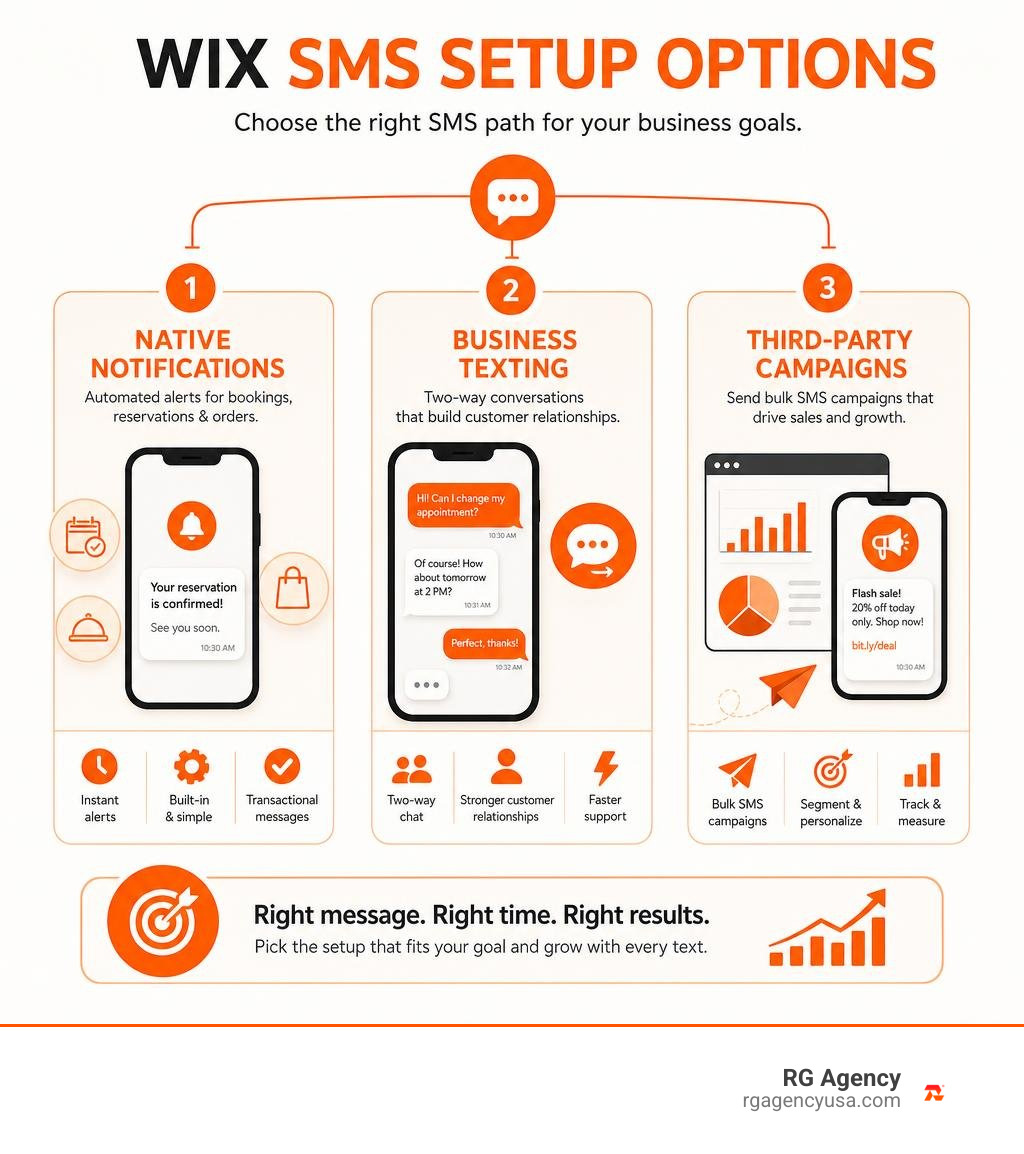
To start SMS marketing for your Wix site, choose the tool that matches your goal:
- Use Wix Messaging for pre-built appointment, reservation, and restaurant-order alerts.
- Add a third-party SMS app for bulk campaigns, cart recovery, custom messages, list segmentation, and two-way texting.
- Collect clear customer consent before sending promotional texts, then test a small campaign before sending to your full list.
SMS works well when speed matters. Texts can reach customers within minutes, making them useful for booking reminders, order updates, flash sales, and abandoned-cart offers. Industry research commonly reports SMS open rates near 98%, with conversion rates that can reach 45% in the right campaign.
Wix’s native SMS tools are helpful, but limited. They support automated messages for Wix Bookings, Table Reservations, and Restaurants Orders, often using fixed content and a generic sender number. Growing online stores usually need an app such as Omnisend, Mercuri, or SMS Blast to run branded bulk campaigns and measure revenue.
I am Roger Aguiar, Owner and CEO of RG Agency, where I help businesses connect SEO, paid media, automation, and SMS marketing for Wix site growth into measurable campaigns. Next, let’s clarify which Wix SMS option fits your store before you spend time setting it up.
Understanding Native Features vs SMS Marketing for Wix Site
Choosing the right mobile messaging path on Wix starts with understanding what native features can handle versus where dedicated tools become necessary. Wix handles millions of web properties worldwide, with thousands of entrepreneurs joining the platform every single day. Because Wix caters to both service providers and complex online storefronts, it offers multiple messaging paths that serve completely different operational needs.
If you only need basic transactional alerts to confirm that a table is booked or an order has been received, native tools might suffice. However, if your goal is driving repeat sales, running flash promotions, re-engaging inactive customers, and tracking revenue attribution, you need to know how these options differ.
| Feature / Capability | Native Wix Messaging | Wix Business Phone Number | Third-Party SMS Marketing Apps |
|---|---|---|---|
| Primary Purpose | Automated transactional reminders & alerts | Manual 1-on-1 customer service & inbound calls | Scalable marketing campaigns & automated sales flows |
| Supported Wix Apps | Bookings, Table Reservations, Restaurant Orders | General communication across your site | Wix Stores, Bookings, Events, Custom Forms |
| Sender Identity | Generic, unchangeable shared Wix phone number | Dedicated local business phone line | Dedicated 10DLC local number, toll-free, or shortcode |
| Custom Message Copy | Pre-set, uneditable system templates | Fully customizable manual responses | Custom templates, dynamic fields, MMS visuals |
| Bulk Campaigns | Not supported | Not supported (manual entry only) | Full bulk broadcast capabilities |
| E-Commerce Flows | None (no native cart recovery via SMS) | Manual texting only | Cart abandonment, browse recovery, post-purchase |
| Two-Way Texting | None (no customer replies supported) | Yes (managed within Wix Inbox) | Yes (dedicated dashboard or synchronized inbox) |
| Revenue Tracking | Basic delivery logs only | Call and message logs | Advanced attribution, link tracking, ROI dashboards |
Understanding these distinctions saves store owners from spending hours trying to turn basic operational notifications into marketing channels. Wix outlines its communication capabilities within its guide on Emails, SMS, and promotions, making it clear that transactional notices and marketing broadcasts serve separate roles.
Native Wix Messaging and App Automations
Native Wix Messaging was built with a clear focus: operational reliability for appointments and food orders. When you activate native messaging, Wix connects directly to Wix Bookings, Wix Table Reservations, and Wix Restaurants Orders (New).
The primary advantage is simplicity. There are no API keys to configure and no third-party accounts to manage. The moment a client books a massage session or orders takeout, Wix automatically dispatches an SMS reminder or status update to their mobile phone.
However, these native alerts have clear technical boundaries:
- Fixed Templates: You cannot edit the wording, insert promotional discounts, or customize the messaging tone. The copy is locked to standard transactional phrases.
- Generic Sender Numbers: Messages come from a pooled system number. Customers cannot tell at a glance that the text is from your specific brand until they read the copy, and they cannot reply to ask questions.
- No E-Commerce Triggers: Native SMS automations do not cover Wix Stores checkouts, meaning you cannot natively trigger an SMS when an online shopper abandons their shopping cart.
For businesses looking to configure these basic features, Wix provides documentation on Wix Messaging: Sending an SMS to Customers Using App Automations to help owners activate pre-installed alert triggers.
Wix Business Phone Number vs Marketing Apps
To address the need for personalized customer service, Wix offers the Wix Business Phone Number. This feature gives you a dedicated business line accessible through the Wix mobile app and desktop dashboard.
While it provides a professional point of contact, it is not a mass-marketing tool. It allows you to place outbound calls, receive inbound inquiries, and manually text back and forth with customers who reach out to your business. It works well for high-touch service businesses—such as custom home builders in Austin, Texas, or boutique consultants in Dallas—who need to answer client questions one-on-one.
In contrast, dedicated marketing solutions like SMS Blast or Notify Customers SMS Marketing are built specifically for scale. Instead of typing individual messages by hand, marketing apps let you:
- Broadcast a flash-sale announcement to thousands of opted-in subscribers at once.
- Insert dynamic tags (such as customer first names or specific cart contents) into every text.
- Deploy rich media (MMS) containing high-resolution product photos or animated GIFs.
- Set up automated drip sequences that nurture new subscribers over several weeks.
Managing Quotas and Renewal Rules
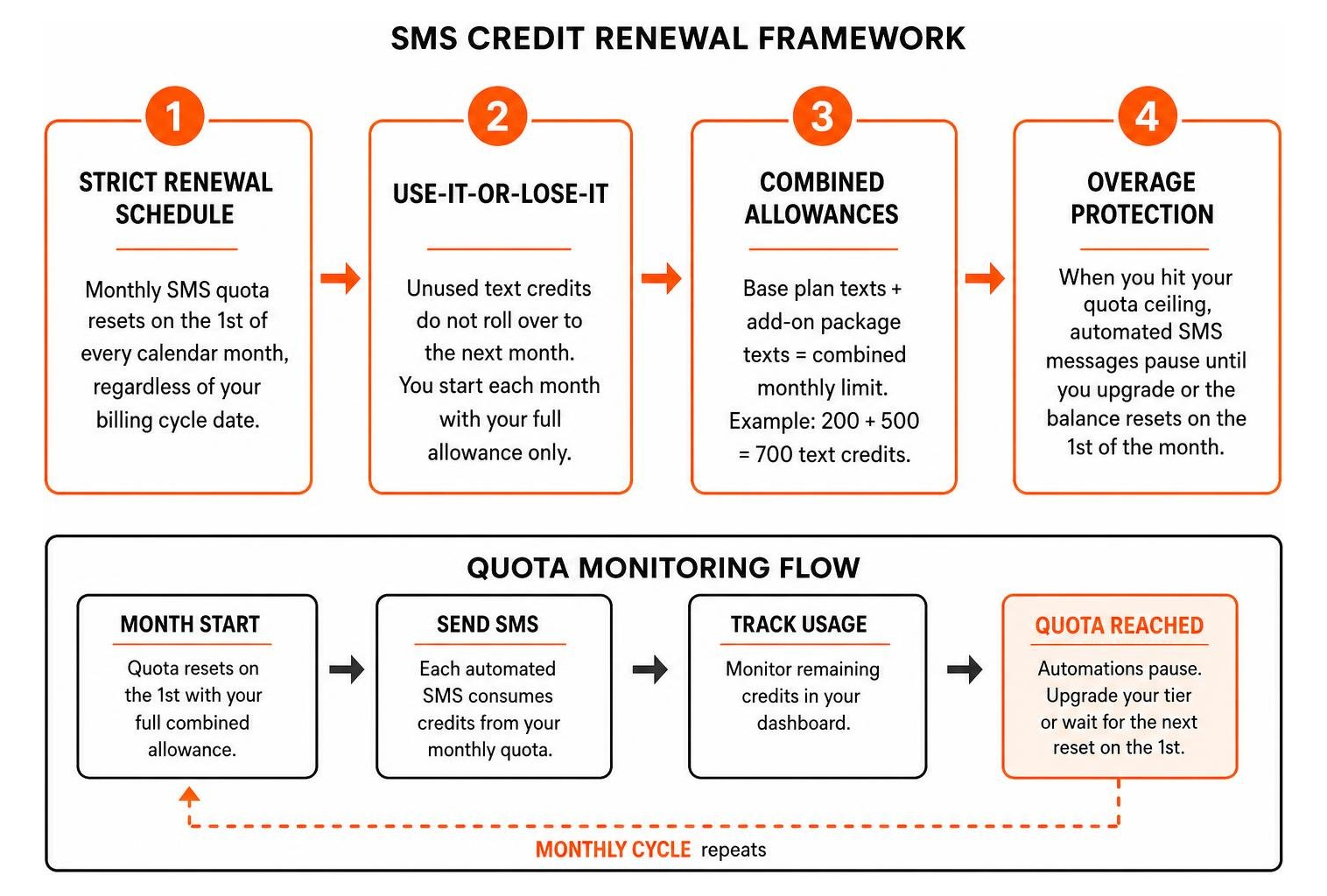
Every text sent through native Wix automations consumes credits from your account’s monthly messaging quota. Your total monthly allowance depends on your active Wix premium plan, and you can purchase standalone messaging packages if your volume grows.
Managing this quota requires an understanding of how Wix accounts for message credits:
- Strict Renewal Schedule: Your monthly SMS quota resets on the 1st of every calendar month, regardless of your billing cycle date.
- Use-It-or-Lose-It: Unused text credits do not roll over to the next month. If your plan includes 200 messages and you only send 50, you start the next month with 200, not 350.
- Combined Allowances: If your base site plan includes 200 texts and you purchase an add-on package of 500 texts, your account displays a combined monthly limit of 700 text credits.
- Overage Protection: Once you hit your quota ceiling, automated SMS messages pause immediately until you upgrade your tier or until the balance resets on the first of the month.
How to Set Up SMS Campaigns and Automations on Wix
Setting up automated mobile messaging allows you to reach shoppers on their most personal devices. Over 60% of business owners plan to expand their text marketing budgets because automated text messages generate significantly higher revenue per message than standard broadcasts.
Across modern storefronts, coordinating your text messaging alongside other digital marketing channels ensures your brand stays top-of-mind without overwhelming your audience.

Enabling Pre-Installed Automations for SMS Marketing for Wix Site
If your business relies on appointments or restaurant orders, enabling Wix’s pre-installed automations takes just a few minutes in your dashboard:
- Log in to your Wix Dashboard and navigate to the Automations tab.
- Select Outgoing Notifications to review your pre-installed triggers.
- Locate the relevant app card (e.g., Wix Bookings: Send a reminder text 24 hours before a session or Wix Table Reservations: Confirm reservation via SMS).
- Click the toggle switch to change the status from Inactive to Active.
- Review your quota counter at the top of the screen to ensure your account has sufficient text credits to handle upcoming appointment volumes.
These automated reminders help reduce no-shows. When customers receive a clear text reminder 24 hours before their scheduled appointment, attendance rates rise immediately—freeing your staff from manual confirmation phone calls.
Integrating Third-Party Apps for SMS Marketing for Wix Site
For online storefronts selling products, third-party apps unlock critical revenue flows such as abandoned cart recovery and VIP promotional broadcasts. Specialized apps like Omnisend, Mercuri, and SMS Alert connect directly with your product catalog and checkout flow.
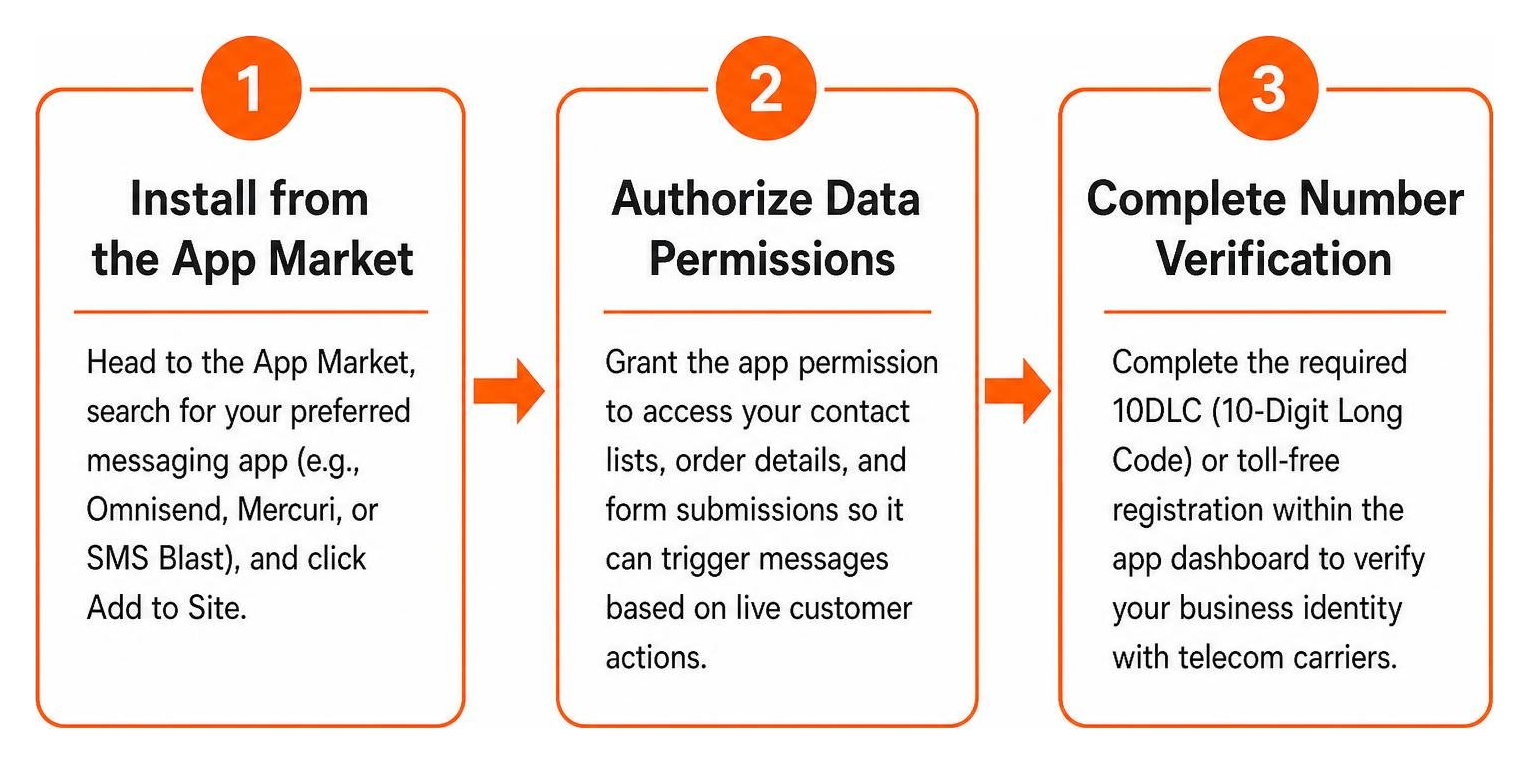
To connect an advanced platform to your Wix store, follow this integration sequence outlined in How to Send SMS on Wix: The Simplest 2026 Guide:
- Install from the App Market: Head to the Wix App Market, search for your preferred messaging app (e.g., Omnisend, Mercuri, or SMS Blast), and click Add to Site.
- Authorize Data Permissions: Grant the app permission to access your contact lists, order details, and form submissions so it can trigger messages based on live customer actions.
- Complete Number Verification: Complete the required 10DLC (10-Digit Long Code) or toll-free registration within the app dashboard to verify your business identity with telecom carriers.
- Sync Store Data: Import your existing Wix contact database, ensuring that only contacts with verified SMS consent are tagged for marketing campaigns.
- Set Up Core Automations: Build your high-ROI automated flows:
- Abandoned Cart Recovery: Send a personalized text 1 to 2 hours after a shopper leaves items in their online checkout.
- Welcome Series: Send an instant discount code when a visitor subscribes via your pop-up form.
- Post-Purchase Shipping Updates: Automatically notify buyers when their order ships, including direct tracking links.
TCPA Compliance and Subscriber List Growth Strategies
SMS is an intimate communication channel. Because text messages land directly in personal messaging apps next to texts from family and friends, mobile carriers and federal regulators enforce strict consumer protection rules.
In the United States, the Telephone Consumer Protection Act (TCPA) governs text message marketing. Violations can carry fines ranging from $500 to $1,500 per unauthorized text message. Building your subscriber list the right way protects your business reputation and your bottom line.
Building Compliant Opt-In Forms and Pop-Ups
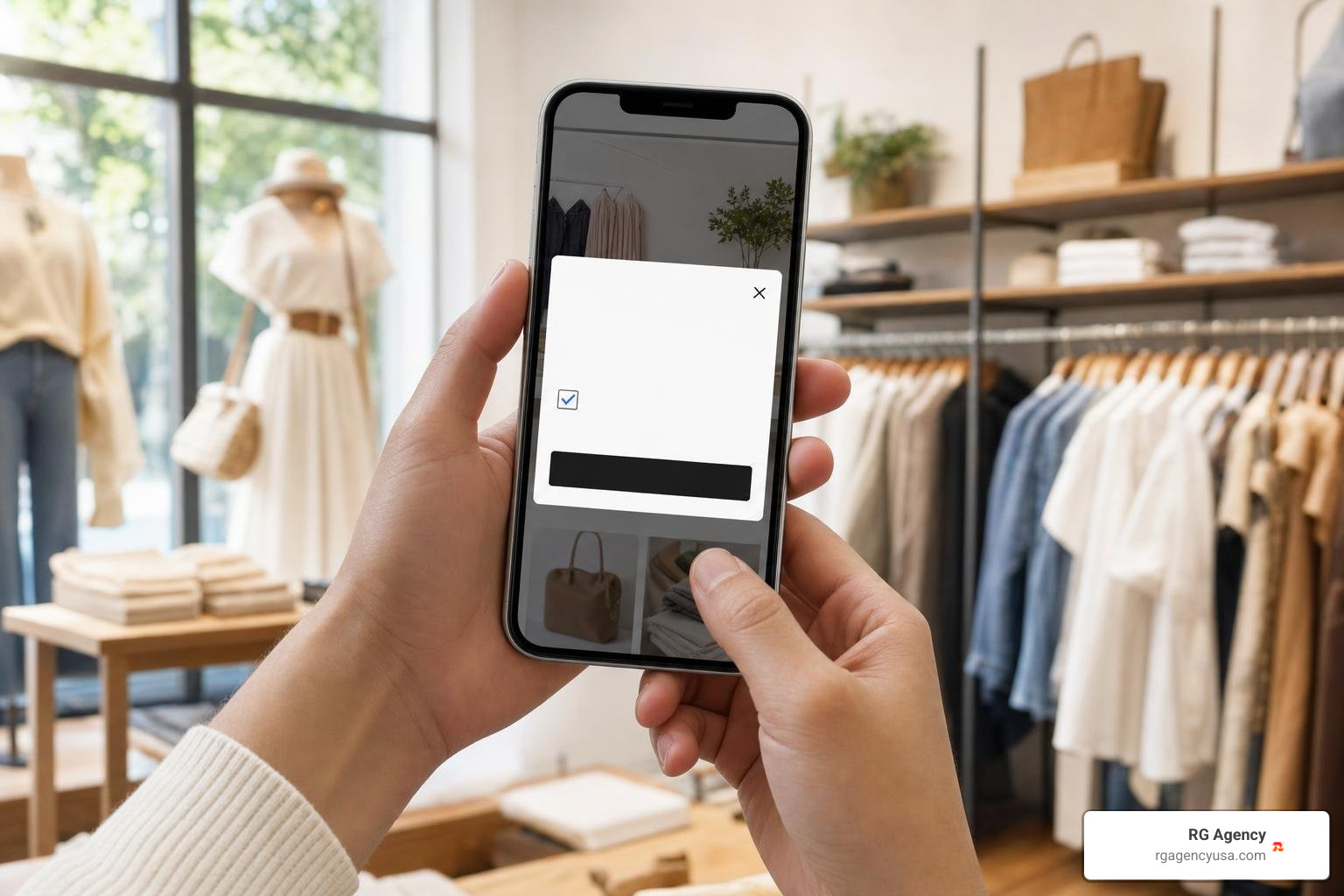
The most important rule in SMS marketing is simple: you must obtain express written consent before sending promotional text messages. Having a customer’s phone number on an invoice or shipping label does not give you permission to send them marketing promotions.
To ensure your Wix opt-in forms and pop-up banners remain fully compliant:
- Use Unchecked Checkboxes: When capturing phone numbers during Wix Stores checkout or on custom forms, the SMS consent checkbox must be unchecked by default. Pre-checked boxes do not constitute legal consent.
- Display Clear Disclosure Language: Position explicit legal disclosures directly adjacent to the submission button. The text must state that agreeing to receive texts is not a condition of purchase.
- Clarify Frequency and Rates: Inform subscribers about expected message frequency (e.g., “Max 4 msgs/month”) and remind them that “Message and data rates may apply.”
- Link Key Policies: Provide direct, working links to your Privacy Policy and Terms of Service.
- Include Mandatory Opt-Out Instructions: Every automated marketing text must clearly inform recipients how to unsubscribe (e.g., “Reply STOP to unsubscribe, HELP for help”).
Using Keywords and Two-Way Texting
Once your compliance disclosures are set up, focus on turning your website traffic into active SMS subscribers. Text-to-join keywords offer a fast, mobile-friendly subscription method.
A keyword is a short word or phrase that shoppers text to your business number to opt into exclusive promotions (such as texting AUSTINVIP or SAVETEN).
You can promote your SMS keywords across several touchpoints:
- Header Announcement Bars: Add a visible banner to your Wix site promoting an instant 10% discount when visitors text your keyword.
- Order Packaging Inserts: Include printed cards in your shipping boxes inviting customers to text a VIP keyword for early access to product drops.
- Physical Store Signage: If you operate a brick-and-mortar showroom in San Antonio, Houston, or Dallas, place counter displays near the register with your keyword and a scannable QR code.
When subscribers text your keyword, modern platforms can respond automatically with a two-way conversational greeting. If a customer replies to ask about sizing or shipping turnaround, two-way messaging lets your support team respond directly from your centralized dashboard.
Best Practices to Maximize SMS Marketing ROI and Engagement
Automated SMS messages generate an average of $0.74 per send compared to about $0.15 for standard email blasts, making text marketing exceptionally efficient. Furthermore, omnichannel strategies that coordinate SMS alongside email and push messaging return an average of $79 for every dollar invested.
To achieve these returns, your SMS strategy should be intentional, respectful, and data-driven.
Personalization, Timing, and Audience Segmentation
Sending generic mass texts to your entire list quickly leads to subscriber fatigue and high opt-out rates. Tailoring your messaging based on subscriber behavior creates higher engagement and protects your sender reputation.
- Segment by Purchase History: Divide your contact list into meaningful segments, such as first-time buyers, VIP spenders, and inactive shoppers. Send your VIPs exclusive early access to product launches, while offering re-engagement discounts to shoppers who haven’t ordered in 90 days.
- Respect Local Quiet Hours: Federal regulations and carrier rules prohibit sending automated marketing messages during nighttime hours (generally between 8:00 PM and 8:00 AM in the recipient’s local time zone). Schedule campaigns around mid-day windows (between 11:00 AM and 2:00 PM) when recipients are checking their phones during lunch breaks.
- Keep Message Copy Concise: Standard SMS segments are capped at 160 characters. Place your core offer and link within the first 100 characters, and always identify your brand name in the very first sentence.
- Incorporate Rich Media (MMS) Sparingly: MMS allows you to include product images and animated visuals. While MMS texts carry higher delivery costs and consume more credits, they can boost conversion rates on high-margin flash sales and holiday launches.
To build an omnichannel approach that coordinates your text campaigns with social outreach, explore our guides to email marketing, social media management, and building a comprehensive, winning marketing strategy for 2025.
Tracking Conversion Rates and Revenue Metrics
Treat SMS like any other revenue-generating channel by tracking its financial performance in detail. Don’t rely solely on basic delivery confirmations; measure the actual commercial return on every message sent.
Key metrics to track within your analytics dashboard include:
- Delivery Rate: Aim for 97% or higher. Lower delivery rates indicate outdated phone numbers or issues with carrier spam filters.
- Click-Through Rate (CTR): Use branded, shortened links with UTM parameters to measure how many recipients click through to your Wix site. A healthy SMS CTR generally ranges between 8% and 15%.
- Conversion Rate: Track the percentage of recipients who complete a purchase within your attribution window (typically 24 to 72 hours post-click).
- Revenue Per Recipient (RPR): Divide total attributed campaign revenue by the number of messages sent. This metric helps identify which promotions resonate most with your audience.
- Opt-Out Rate: Keep unsubscribes under 1% per broadcast. A sudden spike in STOP replies suggests your sending frequency is too high or your messaging lacks value.
Frequently Asked Questions About Wix SMS
Can I send bulk marketing texts directly through native Wix tools?
No. Native Wix Messaging only supports pre-installed, single-recipient transactional automations for Wix Bookings, Table Reservations, and Restaurant Orders.
It does not support bulk promotional broadcasts, custom copywriting, or marketing automations for Wix Stores. To send promotional announcements or cart abandonment sequences, you must install a third-party SMS marketing app from the Wix App Market, such as Omnisend, Mercuri, or SMS Blast.
When does my monthly Wix SMS quota renew?
Your native Wix SMS quota resets on the 1st day of every calendar month at 00:00 UTC, regardless of the date you purchased your Wix premium subscription.
Unused message credits do not roll over to subsequent months. If you exceed your monthly quota before the first of the month, your automated text notifications will pause until you purchase an add-on messaging plan or wait for the monthly quota reset.
Do customers have to opt in before receiving marketing SMS?
Yes. Under TCPA regulations and telecom carrier rules, you must obtain explicit written consent before sending promotional or marketing text messages.
Transactional notices (such as order receipts or urgent appointment confirmations) operate under different guidelines, but promotional marketing requires an affirmative opt-in via an unchecked form box or an inbound keyword text. You must also include clear opt-out instructions (such as “Reply STOP to cancel”) in your marketing communications.
Conclusion
Adding SMS marketing to your Wix site gives you a direct, high-engagement line of communication with your most valuable customers. While Wix’s native messaging tools handle everyday appointment reminders and order confirmations reliably, growing online stores need dedicated marketing integrations to run revenue-generating broadcasts, cart recovery sequences, and audience segmentation.
By building compliant opt-in forms, respecting subscriber preferences, and tracking clear revenue metrics, your business can turn text messaging into a predictable sales channel.
At RG Agency, we help businesses implement data-driven growth strategies that unite paid media, search optimization, and marketing automation into measurable revenue engines. Whether you are running a growing e-commerce brand or scaling a service business across Texas—from Austin and Georgetown to Dallas, Houston, and San Antonio—our team builds unified campaigns that deliver tangible returns.
Explore our full range of Services and discover how our dedicated SMS Marketing solutions can help scale your online store today.