
Pinterest SEO Optimization Turns Visual Searches Into Traffic
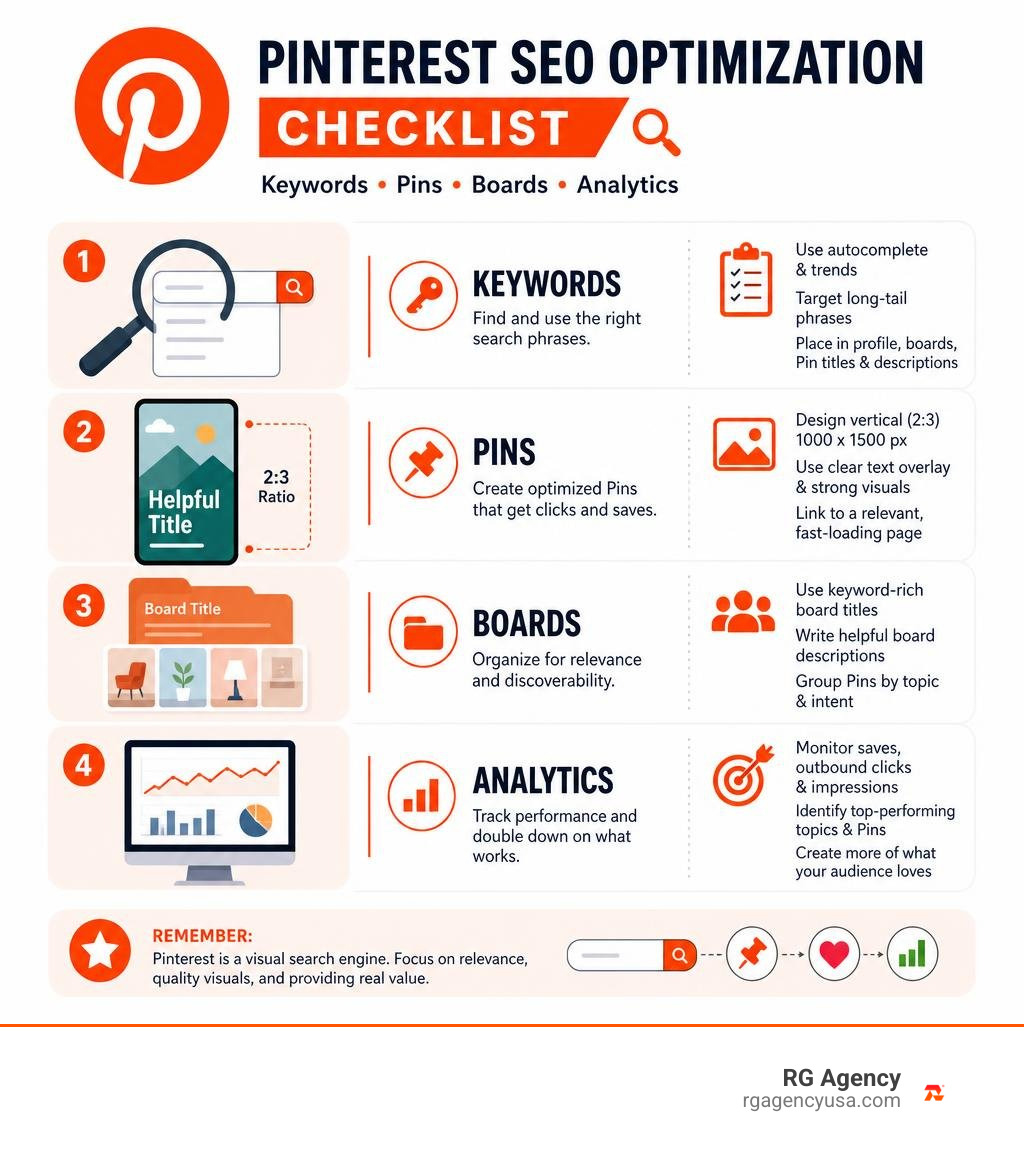
Pinterest SEO optimization helps your Pins appear when people search for ideas, products, and solutions. Start by targeting phrases people use in Pinterest search, place the main phrase in your profile, board, Pin title, and description, then pair it with a clear vertical image built for mobile.
For the strongest early results:
- Use Pinterest autocomplete and Pinterest Trends to find real search demand.
- Create a fresh 2:3 Pin design, ideally 1000 x 1500 pixels, with a simple text overlay.
- Link each Pin to a fast, relevant page that fulfills the promise in the image.
- Track saves and outbound clicks, then make new creative around topics that earn both.
Pinterest is not a typical social feed where a post disappears in a day. It is a visual search engine: users search, browse related ideas, save what matters, and often return when they are ready to act. With most top searches unbranded, smaller businesses can earn discovery without competing only on name recognition.
That creates a valuable opportunity for businesses with useful content, strong products, and a disciplined publishing process. A well-made Pin can continue sending referral traffic long after it is published, while seasonal content can capture demand weeks before a holiday, event, or buying period peaks.
I am Roger Aguiar, Owner and CEO of RG Agency, a data-driven digital marketing agency that helps businesses connect SEO, paid media, web design, and automation to measurable growth. In this guide, I will show how Pinterest SEO optimization can become one clear, trackable part of your broader lead and sales strategy.
How Pinterest Search Works: Smart Feed and Visual Ranking Signals
To win on Pinterest, we first have to recognize what the platform is under the hood. Pinterest functions as a visual search engine powered by an algorithmic Smart Feed, an underlying interest graph, and machine learning models capable of indexing individual objects inside images.
While social platforms organize feeds around recency, social connections, and commentary, Pinterest organizes its feed around relevance, semantic context, and user intent. When a user logs in, the Smart Feed evaluates what they have searched for, what they have pinned, and what related visual entities match their interests. Understanding these dynamics ties directly into the foundational search principles of what SEO is across modern digital platforms: delivering the most relevant, high-quality answer to a user query.
Pinterest’s interest graph maps semantic relationships between topics. If someone searches for living room design concepts, the platform understands related visual entities—such as coffee tables, textured rugs, and wall art—without needing the creator to stuff every single keyword into the text. Pinterest parses both the metadata and the visual elements within the creative asset to classify, score, and distribute content.
Pinterest SEO vs Traditional Google Search
Both platforms serve searchers, but they interpret intent and deliver answers in completely different ways. Google relies heavily on crawling text, evaluating backlink profiles, and matching keyword depth on landing pages. Pinterest, by contrast, is an intent-rich visual playground where users search to plan, design, and buy.
| Feature | Pinterest Visual Search | Traditional Google Search |
|---|---|---|
| Primary Discovery Format | Vertical visual imagery, text overlays, video | Text snippets, title tags, rich snippets |
| Search Intent | Visual planning, product curation, unbranded discovery | Informational answers, local queries, direct transactions |
| Algorithm Mechanism | Smart Feed, Interest Graph, Pinterest Lens visual scanning | Web crawlers, PageRank, entity indexing, backlink evaluation |
| Keyword Graphing | Platform-native interest graphs and visual entities | Semantic lexical search and natural language processing |
| Content Active Lifespan | Long (average active lifespan of 3.5 months to evergreen years) | Medium-to-long (dependent on rankings, decay, and updates) |
| Brand Advantage | Low barrier: 96% of top searches are unbranded | Higher barrier: strong brand authority and domain rank dominate |
Because 96% of top searches on Pinterest are unbranded, users are open to finding new solutions. When someone types a query into Pinterest, they rarely search for a specific household name; they search for an aesthetic, an actionable tutorial, or a problem solver.
The Four Core Algorithmic Ranking Factors
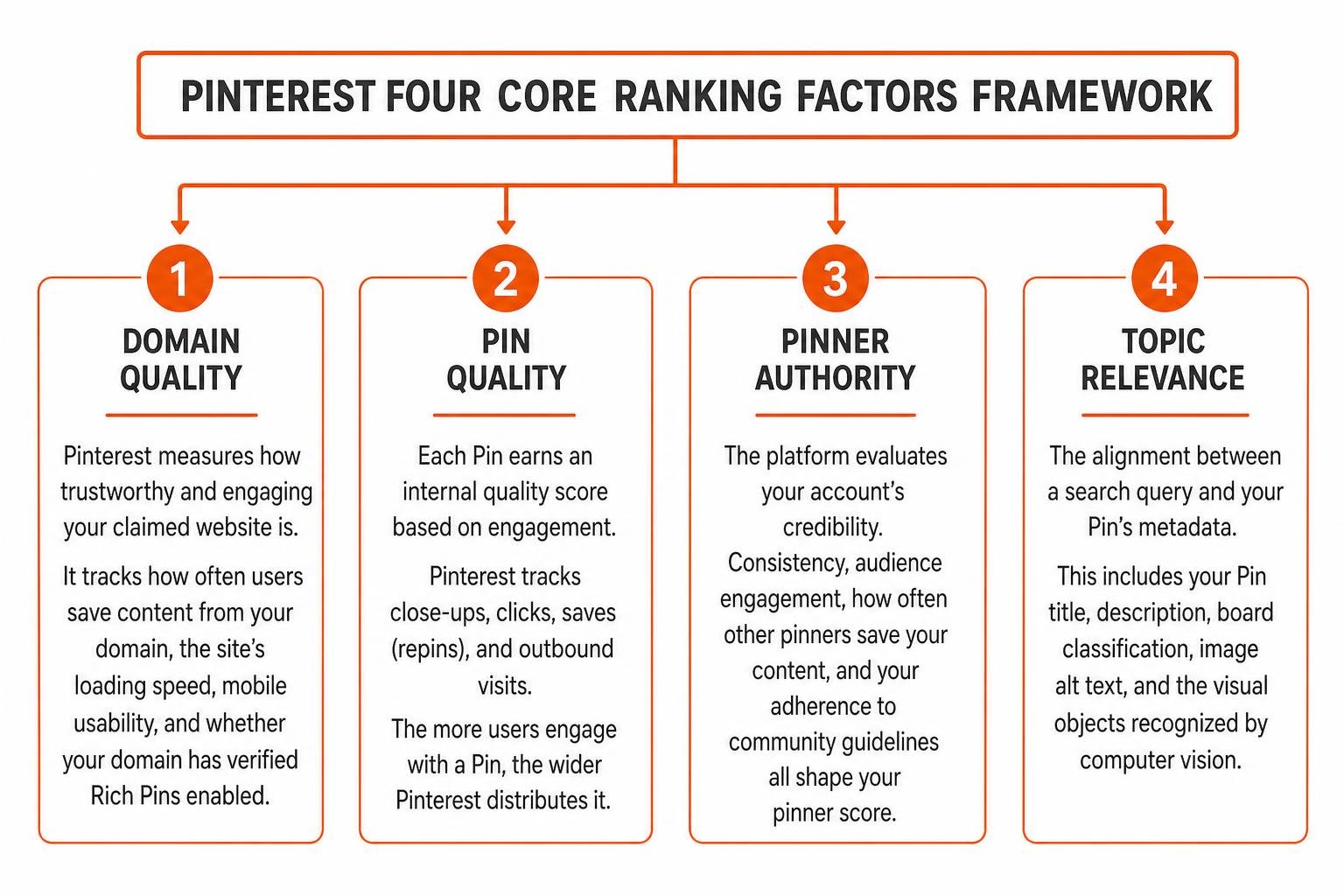
Pinterest’s ranking engine weighs four critical signals when deciding which Pins reach the top of search results and home feeds:
- Domain Quality: Pinterest measures how trustworthy and engaging your claimed website is. It tracks how often users save content originating from your domain, the site’s loading speed, mobile usability, and whether your domain has verified Rich Pins enabled.
- Pin Quality: Each Pin earns an internal quality score based on engagement. Pinterest tracks close-ups, clicks, saves (repins), and outbound visits. The more users engage with a Pin, the wider Pinterest distributes it.
- Pinner Authority: The platform evaluates your account’s credibility. Consistency, audience engagement, how often other pinners save your content, and your adherence to community guidelines all shape your pinner score.
- Topic Relevance: The alignment between a search query and your Pin’s metadata. This includes your Pin title, description, board classification, image alt text, and the visual objects recognized by computer vision.
Core Pillars of Pinterest SEO Optimization in 2026
Achieving consistent visibility requires establishing topical authority and aligning your publishing schedule with seasonal and evergreen demand cycles. A trending topic on Pinterest stays relevant roughly 21% longer than on traditional social platforms. When combined with evergreen topics, your content library builds compounding momentum over time.
Pinterest Keyword Research and Trend Discovery
Keyword research on Pinterest relies on platform-specific user behavior. Because users search visually, their language tends to be descriptive, visual, and focused on solutions.
To uncover high-converting search terms, leverage these native tools:
- Pinterest Search Autocomplete: Type your core concept into the top search bar. The drop-down recommendations reflect high-volume real-time queries.
- Guided Search Chips: When you search a primary phrase, colored suggestion tiles appear below the search bar. These chips represent the natural subtopics users explore next.
- Pinterest Trends Tool: This free analytics tool tracks seasonal spikes, historical search volume, related interests, and demographic breakdowns.
Integrating these insights with your broader keyword research workflow ensures your business targets phrases with validated search demand rather than guessing. For an in-depth breakdown of how discovery mechanics work across visual engines, explore this Pinterest search discovery guide.
Step-by-Step Pinterest SEO Optimization for Profile and Boards
Your profile and boards establish your account’s topical authority. If your boards are disorganized, Pinterest struggles to map your content to its interest graph.
- Business Profile Setup: Ensure you operate a dedicated Business Account. Claim your website domain to unlock in-depth analytics, conversion tracking, and ad campaign integration.
- Keyword-Optimized Profile Name and Bio: Include your core service or product focus directly in your display name (e.g., Brand Name | Modern Interior Design & Decor). In your bio, clearly outline who you serve and what value your content provides using natural search terms.
- Board Clustering: Group your boards into topical clusters. Rather than creating a single generic board, create nested themes. For example, complement a broad board like Kitchen Remodeling with focused boards such as Small Kitchen Storage Hacks and Modern Farmhouse Cabinetry.
- Board Metadata: Fill out every board description with 2 to 3 sentences using primary and secondary keywords. Always assign each board to its correct Pinterest category.
Structuring your boards this way mirrors proven best practices for on-page content optimization, creating clear thematic relevance from the top-level profile down to individual Pins.
Writing Click-Worthy Pin Titles and Descriptions
Writing for Pinterest requires balancing algorithmic discovery with compelling copy that earns clicks.
- The Title Formula (Up to 100 characters): Place your primary target keyword within the first 30 to 50 characters so it remains visible on mobile screens. Keep it direct and benefit-focused. Example: Small Kitchen Storage Hacks: 10 Easy Organization Ideas.
- The Description Formula (Up to 500 characters): Write a natural 2-to-4 sentence summary. Lead with the core topic, incorporate 2 to 3 supporting long-tail keywords, and finish with an action-oriented call to action (CTA).
- Clear Call to Action: Give users a reason to click through to your site, such as “Read the full guide,” “Download the template,” or “Shop the collection.”
Designing High-Converting Visual Pins for Maximum Reach
A keyword-optimized title will not generate traffic if the visual asset fails to capture attention in the feed. With over 80% of Pinterest traffic coming from mobile devices, your creative must be readable and visually distinct on small screens.

Visual Design Standards and Pinterest Lens Recognition
Pinterest Lens and underlying computer vision models scan every image to categorize products, patterns, textures, and text overlays.
Follow these proven design standards:
- Aspect Ratio: Stick strictly to a 2:3 vertical aspect ratio (1000 x 1500 pixels). Square or horizontal images take up less screen real estate, while overly long images (greater than 1:2.1) risk getting clipped in mobile feeds.
- Text Overlays: Use bold, legible fonts that communicate value immediately. Avoid overly ornate script fonts that are difficult to read on mobile devices.
- Color and Contrast: High-contrast color palettes stand out against neutral feed backgrounds. Maintain consistent brand colors and place your logo subtly on the Pin to reinforce authority without overwhelming the design.
- Visual Clarity: Use crisp photography that features clear objects. Clean visuals help Pinterest Lens correctly identify items and display your Pin in “More like this” visual recommendations. Review official guidelines on Pinterest creative optimization to ensure your assets meet technical specifications.
Fresh Pin Strategy and Publishing Cadence
Pinterest prioritizes “Fresh Pins” over repinning the exact same asset repeatedly. A Fresh Pin is defined as a new image or video asset paired with a URL—even if that URL points to an established piece of content on your website.
Publishing 3 to 10 fresh Pins per day is widely considered an effective range for steady account growth. Instead of creating a single Pin for a new blog post or product, design 3 to 5 unique visual variations. Experiment with different text overlay hooks, contrasting background imagery, and alternate color schemes to test which visual concept resonates best with your audience.
AI-Driven Pinterest SEO Optimization and Content Scaling
Scaling fresh creative daily requires an efficient workflow. Generative AI tools can streamline keyword mapping, draft descriptive copy variations, and generate text overlay concepts.
Use structured prompts that define your audience, primary keyword, content tier, and target URL. Have AI draft 3 to 5 description variations incorporating long-tail synonyms, then conduct a quick human review to ensure brand voice, accuracy, and natural phrasing. Combining AI-driven drafts with human oversight allows your team to maintain high creative output without sacrificing quality.
Technical Foundation: Rich Pins, Schema, and Site Claiming
A strong technical foundation signals to Pinterest that your website is an authoritative, secure source of original content.
Claiming your domain involves adding an HTML meta tag to your website header, uploading an HTML verification file to your root directory, or adding a DNS TXT record through your domain registrar. Once claimed, your profile picture and brand identity appear on every Pin originating from your domain. To explore foundational setup requirements in detail, review our guide on technical SEO implementation.
Setting Up Product, Article, and Recipe Rich Pins
Rich Pins automatically synchronize metadata from your site pages to your Pins. If an article title changes or a product price updates, Pinterest refreshes the Pin details automatically.
- Article Rich Pins: Pull the article headline, author name, and meta description, making editorial and blog content look authoritative.
- Product Rich Pins: Display real-time pricing, stock availability, and direct purchase links. These Pins qualify for specialized shopping surfaces and lens-based visual search feeds.
- Recipe Rich Pins: Display ingredients, cooking durations, serving sizes, and dietary ratings directly on the Pin.
Rich Pins rely on Schema.org structured data (JSON-LD) or Open Graph meta tags. After configuring your site markup, enter a URL into Pinterest’s Rich Pin Validator to confirm your tags pass inspection.
Essential Tools for Pin Scheduling and Creative Workflow
Managing a multi-board, keyword-driven Pinterest strategy requires reliable software:
- Tailwind: An official Pinterest partner platform designed for smart scheduling, visual calendar planning, and finding optimal publishing times.
- Canva: Ideal for designing on-brand 2:3 vertical templates with customizable typography and high-contrast layouts.
- Pinterest Native Analytics & Trends: The most reliable first-party data source for monitoring impressions, outbound clicks, and seasonal spikes.
Equipping your team with the right creative and specialized SEO tools helps maintain a consistent publishing workflow while keeping creative quality high.
Analytics, Paid Amplification, and Growth Mistakes to Avoid
Sustainable growth on Pinterest comes from reviewing first-party analytics and continuously refining your keyword and creative approach.
Critical Pinterest KPIs to Measure Organic Growth
Avoid focusing solely on total monthly views, which can be inflated by viral impressions that do not convert. Instead, track these actionable metrics inside Pinterest Analytics and Google Analytics:
- Saves (Repins): The clearest indicator of user intent and content quality. A save rate above 1% indicates high relevance and signals the algorithm to distribute your Pin to wider audiences.
- Outbound Clicks: The number of users who click through to your website landing page. Aim for an outbound click-through rate of 0.3% to 1%+.
- Pin Clicks (Close-ups): Indicates that your image hook and overlay caught a user’s attention in the feed.
- Referral Revenue & Assisted Conversions: Track Pinterest referral traffic inside Google Analytics to measure session duration, bounce rates, and closed transactions.
How Promoted Pins and Ad Campaigns Boost Organic SEO
Running paid campaigns on Pinterest can create a compounding halo effect on organic performance. When you launch a Promoted Pin or Shopping Campaign, paid distribution exposes your asset to targeted audiences.
When users save a Promoted Pin to their personal boards, those saved Pins generate organic downstream engagement at no additional cost. Furthermore, paid campaign reporting reveals high-converting search queries that you can integrate into future organic Pin titles, descriptions, and board architectures. Understanding the synergy between paid and organic campaigns allows you to capture quick wins while building long-term organic authority.
Common Pitfalls and Pinterest SEO Mistakes to Avoid
Steer clear of these frequent mistakes that hinder Pinterest rankings:
- Keyword Stuffing: Stringing disconnected keywords across your descriptions degrades readability and can trigger algorithmic spam filters.
- Deleting Underperforming Pins: Pins often take 4 to 12 weeks to gain organic search momentum. Deleting older Pins resets accumulated domain trust.
- Publishing Identical Creative: Re-uploading the exact same image to multiple boards will cause Pinterest to filter the duplicates. Always create fresh visual variations.
- Ignoring Mobile Formatting: Avoid tiny text, low-contrast color schemes, and horizontal images that get lost in mobile feeds.
- Broken Destination URLs: Never send users to homepages or dead links; ensure every Pin links directly to a relevant, fast-loading destination page.
Frequently Asked Questions About Pinterest Discovery
How long does it take for Pinterest SEO to drive consistent traffic?
Unlike traditional social platforms where content engagement fades within 24 to 48 hours, Pinterest Pins operate on a compounding timeline. Initial algorithmic indexing typically occurs within 2 to 4 weeks. Meaningful search visibility and traffic growth generally develop over 3 to 6 months of consistent, keyword-driven publishing. Because optimized Pins have an average active lifespan of 3.5 months—and often generate traffic for years—the effort compounds over time.
Do hashtags still matter for ranking on Pinterest in 2026?
Hashtags do not provide a dedicated ranking advantage on Pinterest. The search algorithm parses hashtags simply as standard text keywords. Rather than filling descriptions with repetitive hashtags, focus on writing clear, natural sentences that incorporate your primary and secondary target keywords organically.
How many fresh pins should I publish per day for optimal reach?
Publishing 3 to 10 high-quality fresh Pins per day provides consistent algorithmic signals without overwhelming your production workflow. Focus on creative diversity—pairing fresh imagery, varying text hooks, and unique templates with your core content URLs—rather than publishing low-quality duplicate assets.
Conclusion
Pinterest visual search offers businesses a reliable way to capture high-intent, unbranded discovery. By setting up a verified business foundation, researching user search queries, creating mobile-first 2:3 vertical designs, and maintaining a disciplined publishing cadence, you can build an evergreen traffic engine that delivers compounding leads and sales.
At RG Agency, we help businesses across Austin, Dallas, Houston, San Antonio, and Georgetown connect visual search, technical optimization, paid media, and web design into a unified growth engine. Explore our complete suite of RG Agency digital marketing solutions to discover how a data-driven visual search strategy can scale your organic reach.