The Strategic Foundation of City Landing Pages SEO for Service Businesses
Structuring city landing pages for multi-location SEO requires creating dedicated geo-targeted URLs, implementing LocalBusiness structured data with areaServed markup, publishing unique localized proof, and organizing pages under a clear, hierarchical internal linking architecture. This approach enables service area businesses to capture high-intent organic search traffic across neighboring markets without triggering doorway penalties or keyword cannibalization.
When expanding your digital footprint across multiple neighboring markets, search engines need clear signals to understand where you operate and why you belong there. Search intent for local queries is inherently transactional. When someone searches for emergency plumbing or specialized HVAC repairs, they want a provider who can physically arrive at their doorstep promptly.
Matching this intent requires building a localized customer journey. Instead of dumping every suburb into a messy list on your homepage, a dedicated geo-targeted structure gives prospective clients a focused, relevant destination that directly answers their community-specific questions.
Difference Between Physical Storefront Pages and Service Area Pages
To build an effective local search presence, it helps to understand how Google views different business models. The table below outlines how location pages for physical stores differ from service area landing pages:
| Feature | Physical Storefront Page | Service Area Business (SAB) Landing Page |
|---|---|---|
| Physical Address | Displayed publicly with an exact street address and suite number. | Hidden on Google Business Profile; focuses on customer service boundaries. |
| Google Map Pack Proximity | Strong ranking signal tied directly to the physical storefront coordinates. | Limited Map Pack reach; relies heavily on localized organic search results. |
| Primary Page Goal | Drive foot traffic and direct visits to a brick-and-mortar location. | Generate inbound phone calls, quote requests, and on-site appointments. |
| Local Signals | Store hours, parking details, exterior photos, in-store pickup options. | Neighborhood service radiuses, travel timelines, local case studies. |
| Schema Markup | Store or LocalBusiness with explicit address properties. |
LocalBusiness or ProfessionalService utilizing areaServed markup. |
Service businesses often work harder than brick-and-mortar shops to capture local attention because they must hide their physical address to comply with Google guidelines. Mastering these structural differences is essential to understanding what is SEO in a multi-location context.
Why Service Area Businesses Need Dedicated Geo-Targeted URLs
For businesses that travel to their customers, dedicated regional URLs bridge the gap between their primary office and the surrounding communities they serve. Google’s guidelines suggest that smaller operations should generally keep their active service areas within roughly a two-hour driving radius from their base of operations.
Within that travel radius, potential customers search using distinct regional modifiers. When executing high-impact SEO for home service contractors, dedicated URLs allow you to address those exact geographic queries. They allow your site to establish organic relevance in neighboring hubs—such as expanding from Austin into Round Rock or Georgetown—without resorting to deceptive practices or creating phantom Google Business Profiles.
Designing High-Converting City Pages Without Triggering Doorway Penalties
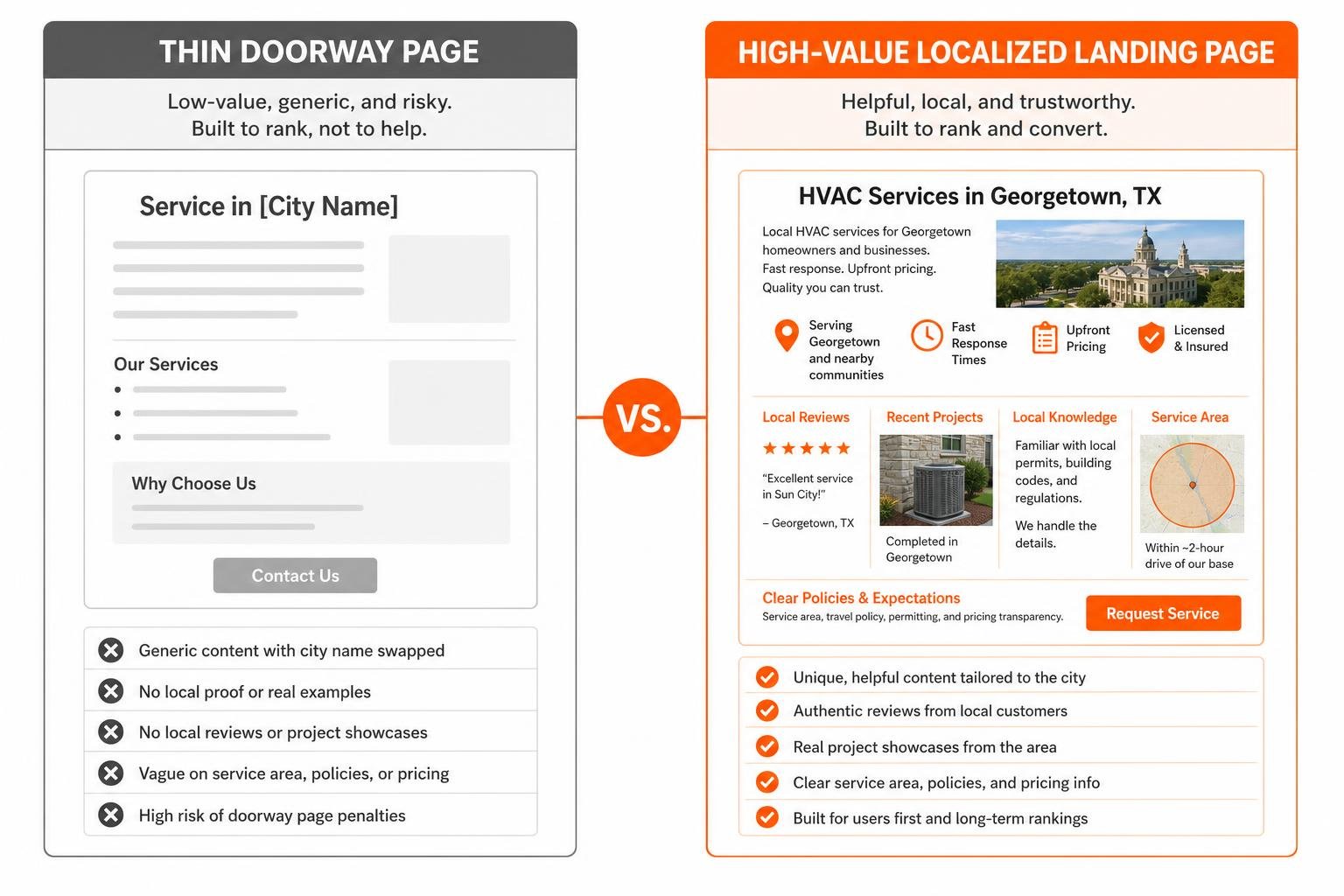
Google actively penalizes doorway pages—low-quality pages built solely to intercept search engines that redirect or funnel users into a single generic destination. Creating thirty identical pages where only the city name is swapped via a basic script creates massive quality and indexing risks under Google’s helpful content systems.
Core On-Page Anatomy and Local Proof Architecture
To rank sustainably and convert inbound visitors, every city page should function as a complete, standalone resource. Mastering on-page SEO fundamentals ensures each element on the page reinforces local relevance and visitor trust:
- Descriptive Title Tags and Meta Descriptions: Craft clear meta titles within 55–70 characters (e.g.,
Commercial HVAC Services in Georgetown, TX | RG Agency) paired with a compelling value proposition in the 150–160 character meta description. - Targeted Heading Structure: Use a prominent H1 featuring the primary service and target municipality, supported by H2s and H3s addressing localized pain points, neighborhood sub-regions, and related offerings.
- Authentic Local Proof: Embed authentic reviews from clients living within that specific municipality, complete with neighborhood references.
- Real Project Showcases: Include high-resolution images of actual work completed in the area, detailed case studies, and localized project narratives.
- Clear Dispatch and Pricing Expectations: Clarify service radiuses, travel policies, municipal permit handling, and direct calls to action.
Eliminating Thin and Duplicate Content Across Regional Clusters
Avoiding duplicate content penalties requires building genuine utility into every page template. Rather than relying on boilerplate text, ground your copy in the real-world conditions of each city.
Address community-specific challenges directly. For instance, a home services provider operating in Central Texas might focus on limestone soil foundation shifts in Austin while highlighting hard water buildup solutions in nearby Georgetown. When highlighting civic infrastructure, referencing authoritative public information—similar to how municipal data is shared across civic portals like the City of Rochester—demonstrates a deep familiarity with local regulatory standards, building codes, and municipal guidelines.
Technical SEO, Architecture, and Internal Linking Structures
Even the most well-written city pages will struggle to perform if search engine crawlers cannot easily discover, crawl, and interpret them. A clean technical foundation ensures search bots distribute crawl budget efficiently across all regional landing pages.
Advanced Technical Architecture for City Landing Pages SEO
Deploying solid technical SEO best practices is vital when scaling multi-location websites. First, implement structured data using LocalBusiness or Service schema. Utilize the areaServed property containing City or AdministrativeArea schema types, and define geographic service boundaries using GeoShape or GeoCoordinates where appropriate.
Maintain strict canonicalization hygiene. Every individual city page must feature a self-referential canonical URL to avoid accidental consolidation into the primary homepage. Keep XML sitemaps cleanly segmented by location clusters, verify that all URLs resolve with clean 200 HTTP status codes, and prioritize improving Core Web Vitals to ensure instant load times on mobile devices.
Site Navigation, Crawl Depth, and Internal Link Hierarchies
A common challenge on large websites is orphan pages—city URLs published without supporting internal links. If a page is only discoverable via a raw sitemap submission, search engines may treat it as a low-priority doorway.
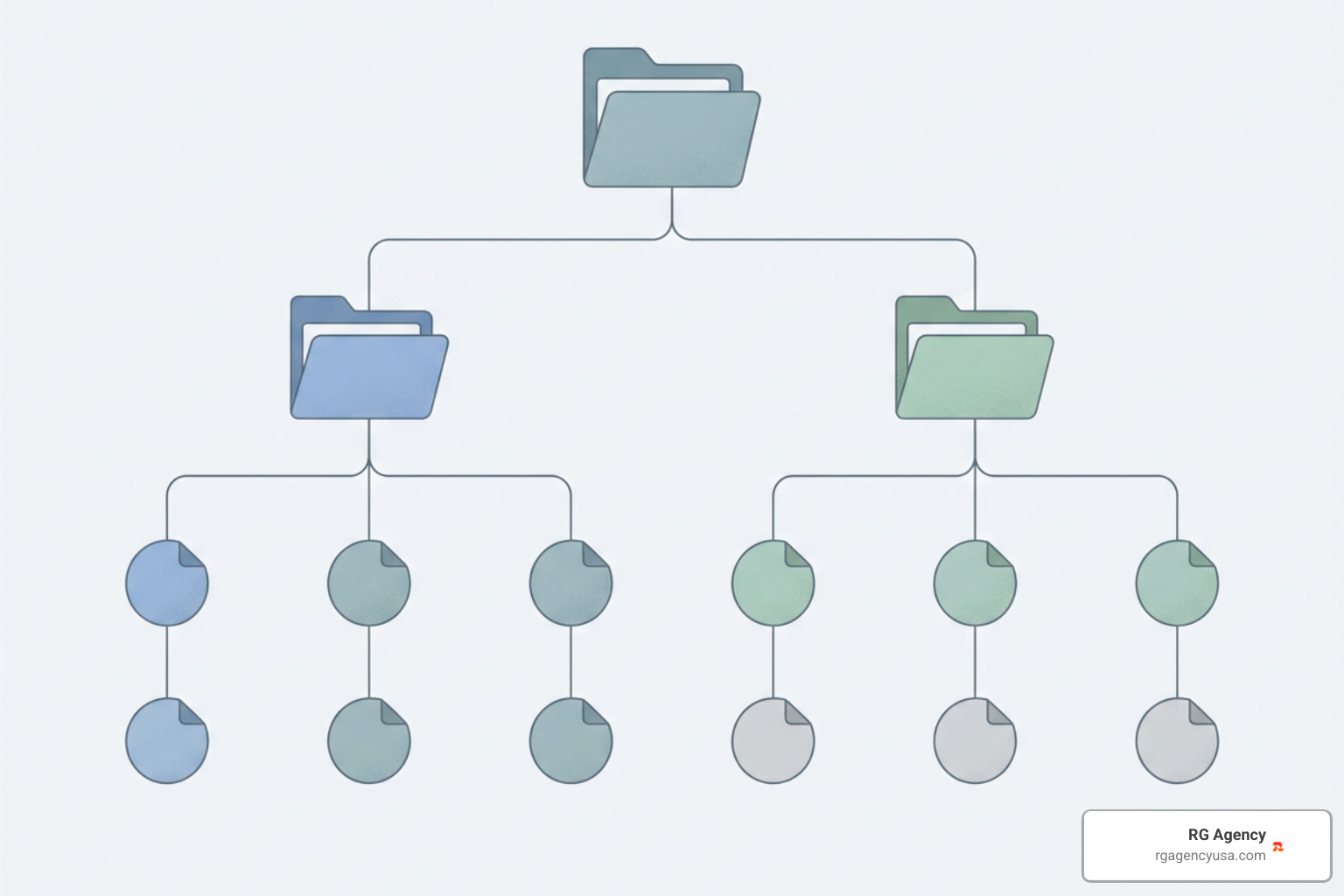
When designing a large-scale architecture, an enterprise SEO strategy relies on logical tier hierarchies:
- Top-Level Hub: Create a clean
/locations/or/service-areas/parent directory linked from the primary site navigation or header. - Regional Indexing: Organize pages into regional clusters (for example,
/locations/texas/austin/and/locations/texas/georgetown/). - Intent-First Contextual Anchors: Link across related services within the same geographic zone using natural, descriptive anchor text.
- HTML Sitemaps: Maintain a user-facing HTML directory in the site footer so visitors and search engine spiders can access any city landing page within two to three clicks from the homepage.
Prioritizing Target Markets and Measuring Local Search Performance
Building dozens of regional pages simultaneously without a clear plan can dilute your site’s authority. Instead, take an intentional, phased approach by prioritizing high-opportunity markets first.
Market Prioritization and Keyword Mapping for City Landing Pages SEO
Effective expansion starts with thorough, strategic keyword research. Evaluate local search volume alongside business metrics such as average ticket size, travel overhead, and profit margins.
For instance, when rolling out tailored localized market targeting in Austin, analyze whether nearby suburban areas like Round Rock, Cedar Park, or San Marcos offer strong commercial search intent paired with manageable organic competition. Target the highest-margin, accessible suburbs first before expanding into secondary and tertiary markets.
Tracking KPIs, Local Rankings, and Geo-Grid Conversions
To evaluate how well your city landing pages perform, monitor key performance metrics across multiple search channels:
- Search Console Impressions and Indexation: Track non-branded query impressions (
[service] in [city]) and check indexation coverage to confirm Google is discovering and indexing each URL. - Geo-Grid Organic Tracking: Use localized rank trackers to observe how your organic search visibility changes across specific zip codes.
- Localized Goal Completions: Set up dedicated tracking numbers or forms to measure leads generated directly by specific city landing pages.
- Click-Through Rate (CTR) Optimization: Continuously refine title tags and meta descriptions to improve user engagement on the SERP.
Consistently monitoring these metrics reveals how maximizing the power of SEO turns regional landing pages into reliable, predictable lead engines.
Frequently Asked Questions About City Landing Pages
Should city landing pages be hidden from the main navigation menu?
You do not need to list dozens of individual city pages in your main header dropdown. In fact, cluttering your primary menu with too many links can frustrate users. Instead, place a single “Service Areas” or “Locations” link in the main navigation that leads to an organized hub page, and provide comprehensive regional links in the site footer and HTML sitemap.
How many city landing pages can a business safely build?
There is no arbitrary limit on the number of city landing pages you can publish, provided every page is genuinely unique, provides real value, and represents a market you physically serve. However, publishing hundreds of automated, thin pages overnight risks doorway penalties and wastes crawl budget. Expand in batches, focusing on high-quality content for each new location.
Can city pages rank in Google’s Map Pack without a physical address?
City landing pages primarily target localized organic search results rather than the Google Map Pack. While your Google Business Profile can rank in the Map Pack for areas near your registered location, organic city pages capture searchers browsing standard web results, securing visibility across a much broader geographic footprint.
Conclusion
Scaling a multi-location digital presence requires balancing user value with technical search best practices. By building fast, locally unique pages that highlight authentic proof, maintaining clean internal links, and avoiding cookie-cutter doorway templates, your business can capture valuable search traffic across every community you serve.
If you are ready to expand your reach and turn multi-location search into a scalable revenue driver, explore how our team can help by scaling multi-location growth with RG Agency.